
Our readers keep the lights on and the garage heater humming. As an Amazon Associate, I earn from qualifying purchases.
Specs are compiled from manufacturer listings and verified buyer reviews and can change over time — please confirm the key details on the product page before buying.
You load up the family, hit the interstate, and ten miles from home every device goes dark. Kids can’t stream. The navigation map spins. Work emails just… stop. That is the exact moment you realize your phone’s hotspot is not built for a moving car. A dedicated Wi-Fi hotspot for your vehicle solves that: it grabs the strongest cellular signal it can find, shares it with every passenger (often with a stronger antenna than your phone has), and keeps running whether you are parked for lunch or cruising through the mountains for hours. The trick is picking one that actually works with your carrier, survives road-life, and delivers real speed — not just promises.
I’m Mo Maruf — the founder and writer behind GoCarLife. This guide is built by comparing the manufacturers’ published specifications and the patterns across verified customer reviews, so you get each pick’s real strengths and trade-offs instead of marketing spin.
Whether you live on the road or just want reliable internet for the campground, these seven picks cover the range of what you need from a proper wi-fi hotspot for a car.
Our Picks at a Glance


How To Choose The Best Wi-Fi Hotspot for a Car
Picking the right mobile internet device for your vehicle depends on balancing speed, carrier support, power source, and durability. A hotspot you leave plugged into your 12V outlet is a different beast from a battery-powered unit you toss in a backpack. Here are the three factors that make or break the experience.
Carrier and Network Compatibility
Not every hotspot works with every carrier. Some are locked to AT&T, others are fully open up for T-Mobile or Verizon. Check the band support in the specs — if you are a Verizon user, a device built only for T-Mobile bands will be a paperweight. Dual-SIM models let you carry two SIMs and switch (or failover) to whichever has signal at a given mile marker, which is huge for cross-country travel.
Power Source and Safety
Battery-powered hotspots are convenient for camping and using outside the car, but a lithium battery left in a hot parked car degrades quickly and can be a fire risk. Some dedicated car hotspots omit the battery entirely and run off USB power instead — safer for permanent installation. If you do want battery backup for short power outages, aim for a unit with a replaceable cell so you are not replacing the whole device in a year.
Speed, Range, and the Number of Devices
Your hotspot is useless if it can only handle a phone and a tablet without buffering. Look at the Wi-Fi generation (Wi-Fi 5 vs Wi-Fi 6) and the cellular category (Cat4 for moderate speeds, Cat6 or Cat12 for higher throughput). Wi-Fi 6 handles dense device loads better — critical if you are running a laptop, two phones, a tablet, and a Nintendo Switch at the same time. External antenna ports can dramatically improve range in rural or wooded campsites.
Quick Comparison
| Model | Best For | Max Data Speed | Wi-Fi Generation | Power Source | Amazon |
|---|---|---|---|---|---|
| GL.iNet GL-X3000 Spitz AX★ Best Overall | Full-time 5G power users | 3000 Mbps | Wi-Fi 6 | AC adapter (USB-C) | Amazon |
| FIRSTNUM CPE C600CValue Champ | Budget 4G with battery backup | 1200 Mbps | Wi-Fi 5 | AC adapter + 4-5 hr battery | Amazon |
| BNBDE TD20 Portable Hotspot | Battery-free in-car safety | 150 Mbps down / 50 Mbps up | Wi-Fi 6 | USB power only | Amazon |
| TravlFi Journey1 LTE | No-SIM RV simplicity | 150 MB/s | Wi-Fi (unspecified gen) | AC adapter + internal battery | Amazon |
| TravlFi JourneyGo LTE | Long battery travel | — | Wi-Fi (unspecified gen) | AC adapter + 16 hr battery | Amazon |
| NETGEAR Nighthawk M6 Pro | Highest potential speed | 3600 Mbps | Wi-Fi 6E | AC adapter + 5040mAh battery | Amazon |
| GL.iNet GL-XE3000 Puli AX | 5G with long battery backup | 3000 Mbps | Wi-Fi 6 | AC adapter + 6400mAh battery | Amazon |
In‑Depth Reviews
1. GL.iNet GL-X3000 Spitz AX
Our pick — over 4★ from 850+ verified ratings; the strongest balance of quality and price.
The mobile 5G router that brings fiber-level speeds to the front seat.
If raw speed and advanced network management matter most, the Spitz AX is the long-haul king. It dishes out up to 3000 Mbps in combined Wi-Fi 6 speeds (574 Mbps on 2.4 GHz and 2402 Mbps on 5 GHz) and its dual-SIM slots let you run AT&T on one and T-Mobile on the other, switching automatically when a signal drops. Buyers report initial speeds hitting 230 Mbps down and 70 Mbps up — though some note latency climbs to 100ms and speeds tank after several days until a reboot.
The device runs on a customizable OpenWrt-based firmware, which gives advanced users access to VPN tunnels (OpenVPN at 150 Mbps, WireGuard at 300 Mbps), load balancing across Ethernet, repeater, and tethering connections, and DNS-over-TLS privacy. That level of control is rare in a car-ready router. On the downside, the router handles 2.4 and 5 GHz band separation poorly for smart-home gear, and the 2-band carrier aggregation limits raw throughput compared to newer 5G designs. It costs more than anything else in this roundup — but for someone who needs office-grade internet in an RV or remote cabin, it is a powerhouse that buyers call “the best 5G router, hands down.”
The X3000 is 2.5x faster on paper than the 4G C600C below (3000 Mbps vs 1200 Mbps), though that advantage only fully shows with a strong 5G signal and a data plan that supports high speeds. In areas without 5G coverage, the C600C is more than adequate for the money.
Who it’s for: Power users who want carrier-agnostic 5G with VPN, failover, and enough speed for video calls and streaming on multiple devices simultaneously.
One real trade-off: The price tag is steep, and the router occasionally requires a manual reboot to recover top speeds after a few days of uptime.
Grab it if: you rely on internet for work on the road and need carrier flexibility and maximum speed.
Look elsewhere if: you are on a tight budget or only need occasional hotspot access for short trips.
2. FIRSTNUM CPE C600C 4G Router
The inexpensive 4G router that doubles as a mobile battery pack.
Not everyone needs 5G. If you primarily travel through well-covered highways and want a simple plug-and-play device, the C600C delivers strong 4G LTE performance at a fraction of the cost. Its Cat7 modem reaches download speeds up to 150 Mbps and uploads up to 50 Mbps over LTE (the router claims 1200 Mbps Wi-Fi throughput, which is the local Wi-Fi speed, not the internet speed). Performance is what buyers mention most often — ten owners single it out positively for road-trip reliability with a third-party GSM SIM and a 12V car converter.
The built-in battery lasts an honest 4 to 5 hours, according to reviews, which makes it handy for short stops or tailgating without running the engine. You can connect up to 32 devices, which is far more than any typical family needs. The flip side: connectivity gets mixed marks — six owners flagged issues, particularly with T-Mobile SIMs. “Is not compatible with T-Mobile SIM card was on phone with T-Mobile for many days trying to get this to work,” one owner wrote. The antennas are non-removable, and the shape is awkward for carrying. Still, owners who get it working praise the support team — one called it “top notch” after receiving a replacement unit and a firmware fix.
At this price, the C600C is a sensible entry point. If you need T-Mobile specifically or want external antenna options, check the GL.iNet options instead.
What owners love
- Cheapest dedicated car hotspot on the list
- Internal battery allows 4-5 hours of cable-free use
- Supports up to 32 devices simultaneously
Where it falls short
- Not compatible with T-Mobile from the start per several reviews
- Non-removable antennas limit range upgrades
- Wi-Fi 5 standard is older than the competition
Reach for this if: you use AT&T or a GSM MVNO and need a cost-effective 4G router with battery backup.
skip it if: you are on T-Mobile or need fast 5G for streaming in 4K.
3. BNBDE TD20 Portable Hotspot
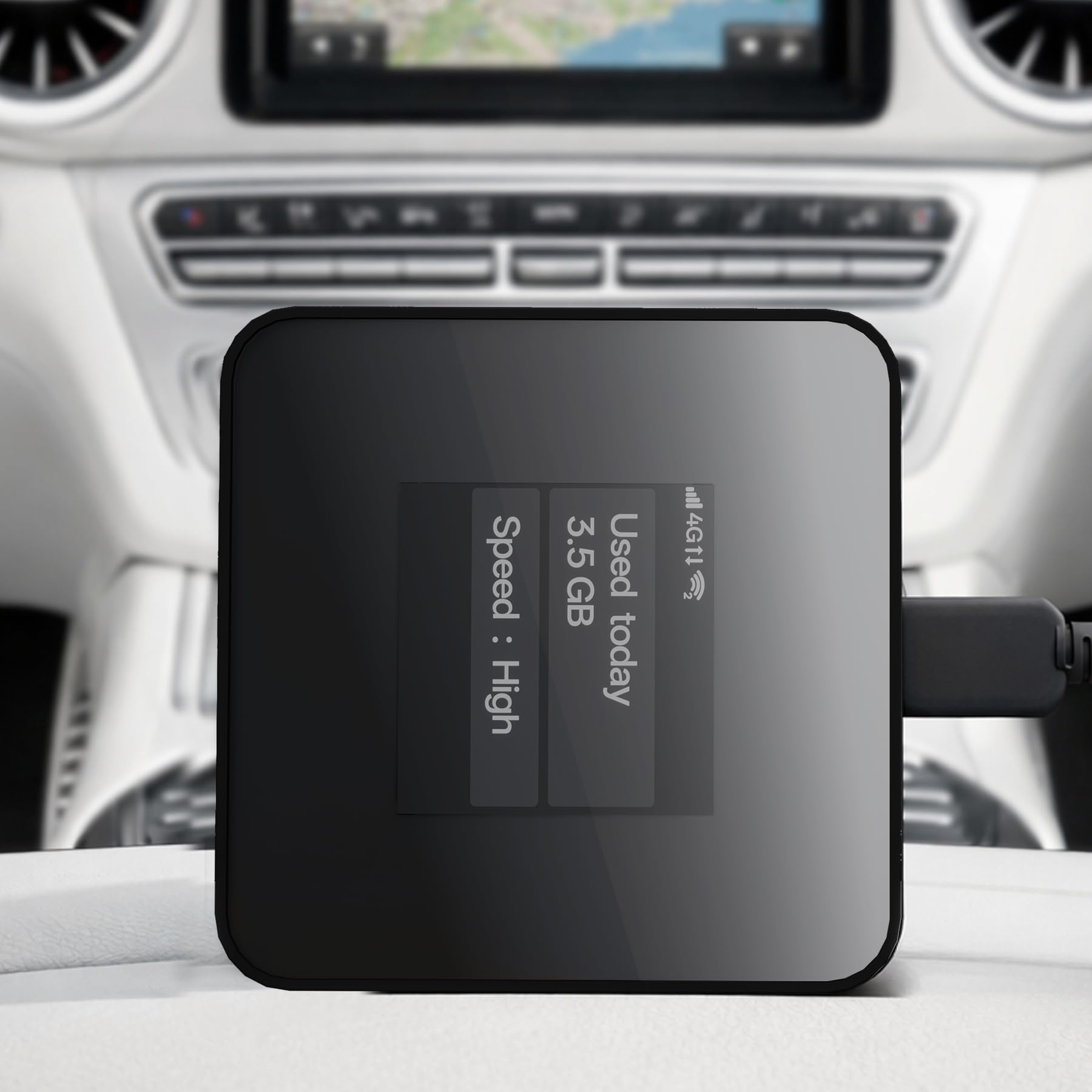
The pocket-sized hotspot designed to sit safely in a hot car all day.
Most hotspots use lithium-ion batteries that swell and degrade in the summer heat of a parked car. The TD20 eliminates that risk entirely — it has no internal battery. It runs on USB power only, meaning you plug it into your car’s USB port or a power bank and it works. For anyone who intends to leave a hotspot permanently installed in a glove compartment or center console, that is a meaningful safety advantage. It is also tiny — just 2.44 inches square and half an inch thick.
On the connectivity side, the TD20 uses 4G LTE Cat4 (downloading up to 150 Mbps, uploading up to 50 Mbps) plus Wi-Fi 6 for the local network, and it handles up to 16 devices. It uses eSIM (vSIM) technology, so it comes with 10 GB of US data preloaded and no physical SIM card required — you just activate the included plan and go. For international travel, it works in 150+ countries on local networks. Owners say the city and home performance is “excellent,” while mountain terrain brings the typical dead-zone struggle: “would connect to my phone, but always gave me the message ‘No Internet connection,'” one reviewer noted. The convenience of no battery also means a power bank is needed if you want to use it away from the car. As one owner described it, “the only issue is that my car’s charging port is already used for something else, so I normally power it with a power bank.”
If you want a set-and-forget device strictly for in-vehicle use and do not want to worry about battery degradation, this is the cleanest solution.
Ideal for: permanent car installation in hot climates or long-term daily commuting in signal-rich areas.
One thing to know: it struggles in remote mountain zones and requires a USB power source at all times, limiting standalone portability.
Best for daily commuters & safety-conscious buyers: no battery fire risk and includes 10GB of starter data.
Think twice if: you camp in deep wilderness or need an always-on device without a power bank.
4. TravlFi Journey1 LTE

The prepaid travel hotspot that swaps SIM hassle for e-SIM convenience.
The Journey1 is built for RVers and campers who want internet without the headache of finding the right SIM card. It uses e-SIM technology and comes with a large assortment of U.S. prepaid plans ranging from 2 GB to unlimited — no contract, no SIM swapping. The device itself is small enough to slip into a pocket and works virtually anywhere cell towers exist in the U.S. Setup takes less than five minutes, which is the second-most praised aspect of the device by owners (22 buyers mention it positively).
Reliability is the top praise from owners — 60 people call it a dependable connection, and several note it “performs better than home cable modems” in some spots. Of course, like any LTE hotspot, it relies on the nearest cell tower. That is clearly spelled out in reviews: “Works great as long as you have access to cell phone towers.” In places with strong signal, it streams TV without buffering and handles multiple devices easily. The catch is value — 30 owners flagged it as mixed, partly because the data plans carry a per-GB premium compared to a standard phone plan or a consumer-grade prepaid tablet SIM. One owner was blunt: “It ok but what they want for the price to use it is high so we don’t use it.” Signal strength and speed are both mixed in the reviews as well — expect solid performance in decent coverage areas, but frustrating buffering in fringe zones.
For a weekend RVer who wants zero-configuration internet and does not already have an unused data SIM, the Journey1 is a legitimate choice. For power users or those on a per-GB budget, a third-party data-only SIM in an open up router might stretch further.
Standout feature: Bring-your-own-plan flexibility without needing a physical SIM — choose data as you go, from 2 GB to unlimited.
Honest trade-off: The monthly data cost is higher than adding a tablet line to an existing phone plan, so check your carrier’s hotspot rates first.
Choose this for: a fuss-free, no-SIM, no-contract internet solution for RV travel and weekend camping.
Consider alternatives if: you stream heavily every day and want the lowest possible per-GB cost.
5. TravlFi JourneyGo LTE
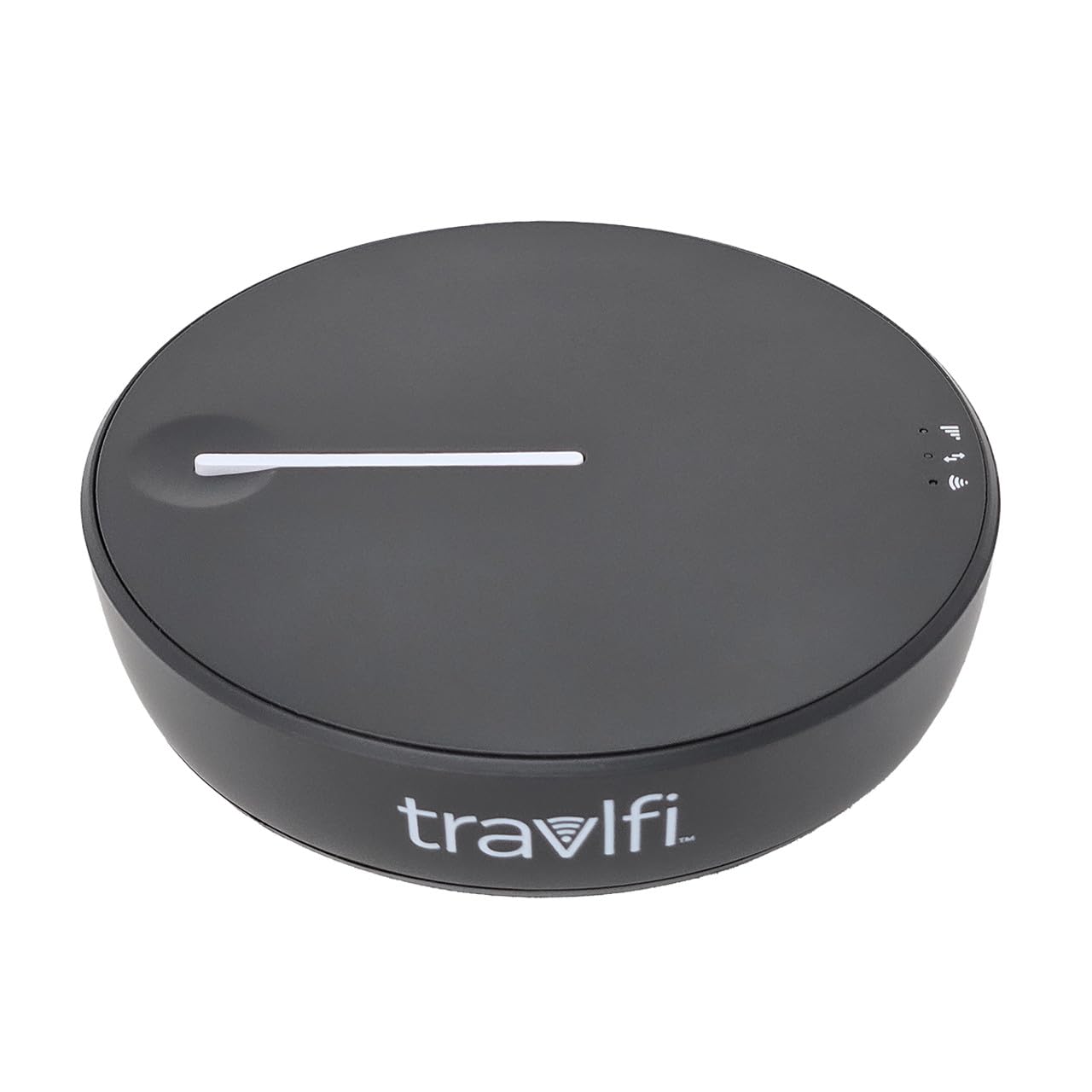
The all-day hotspot that lasts through a full cross-country drive.
At its core, the JourneyGo is very similar to the Journey1 — same e-SIM prepaid model, no-contract data plans, nationwide U.S. coverage. what separates it is the battery: a full 16 hours of runtime, according to owners. That is enough for a full day of driving plus an evening of streaming at the campsite without hunting for a power outlet. It also supports up to 10 devices simultaneously, and owners note it is “small,” “fast charging,” and “very portable.”
Travelers who take weekend RV trips praise the JourneyGo for smooth TV and movie streaming. Setup is easy — “very easy to do as well the speed keeps up with our devices,” one owner wrote. Like the Journey1, reliability depends heavily on cellular tower proximity. There is a clear minority experience where reception falls short: one buyer mentioned “terrible” performance, saying it “lacks signal strength for TV streaming or smart assistants” even though it worked fine for smartphone internet (slower than 5G). The data plans for Canada are notably expensive per some feedback. But for U.S. use, the JourneyGo is a strong choice for anyone who wants a travel hotspot they can use all day without being tethered to a 12V outlet.
Between the two TravlFi units, the JourneyGo is better for off-power usage and the Journey1 is better for minimal upfront cost.
top-tier feature: The 16-hour battery life dwarfs almost every other portable hotspot on the market.
One real limitation: In weak signal areas, streaming video can be unreliable, and roaming data in Canada is costly.
Pick this if: you need an all-day portable hotspot for long drives and boondocking without plugging in.
pass on it if: you need strong speeds for heavy streaming in remote locations or want a budget-friendly per-GB data plan.
6. NETGEAR Nighthawk M6 Pro MR6500 (Renewed)

The 5G beast that can hit 8 Gbps with mmWave — if you are in the right city.
Want the absolute top-end speed possible in a mobile hotspot today? The Nighthawk M6 Pro is the device. It packs a Qualcomm Snapdragon X65 chipset, supports both mmWave (n260 band) and Sub-6 5G, and claims up to 8 Gbps over 5G with 3.6 Gbps Wi-Fi 6E throughput (AXE3600). It has a 2.8-inch color touch screen for managing the network, a 5040mAh battery, and a 2.5 Gbps Ethernet port — the only unit here with a wired port that fast. It handles up to 32 devices on tri-band Wi-Fi.
Here is the reality check: this is a renewed (refurbished) unit from a third-party seller, and reviews are split. Some owners consistently get 100 Mbps near a window and call it a “good deal so far” for temporary setups like travel or barracks. Others received defective units with APN errors, T-Mobile signal failure, or lock issues despite open up codes. “Defective Device & Zero Quality Control” was the headline on one 1-star review. The device also runs hot — several owners remove the battery and add an external cooling fan for high-power mode. Build quality and QC are inconsistent, which is common for renewed electronics.
If you are a networking enthusiast who wants the fastest possible hardware and is comfortable troubleshooting (and potentially returning a unit), the Nighthawk M6 Pro is class-leading on paper. For the general buyer, the QC gamble and heat management are serious considerations.
Where it excels
- Highest theoretical speed (mmWave + Wi-Fi 6E) of any device here
- Touch screen makes setup and monitoring intuitive
- 2.5 Gbps Ethernet port for wired backup
Where it struggles
- Refurbished quality control is inconsistent—some units arrive faulty
- Runs very hot, often requiring battery removal and a fan
- Wi-Fi range is “mediocre,” per owners
Only for the tinkerer: if you know how to troubleshoot APNs and tower bands and want the fastest possible mobile speed.
Not for the typical buyer: the heat, QC risks, and setup complexity make it hard to recommend for a simple in-car hotspot.
7. GL.iNet GL-XE3000 Puli AX
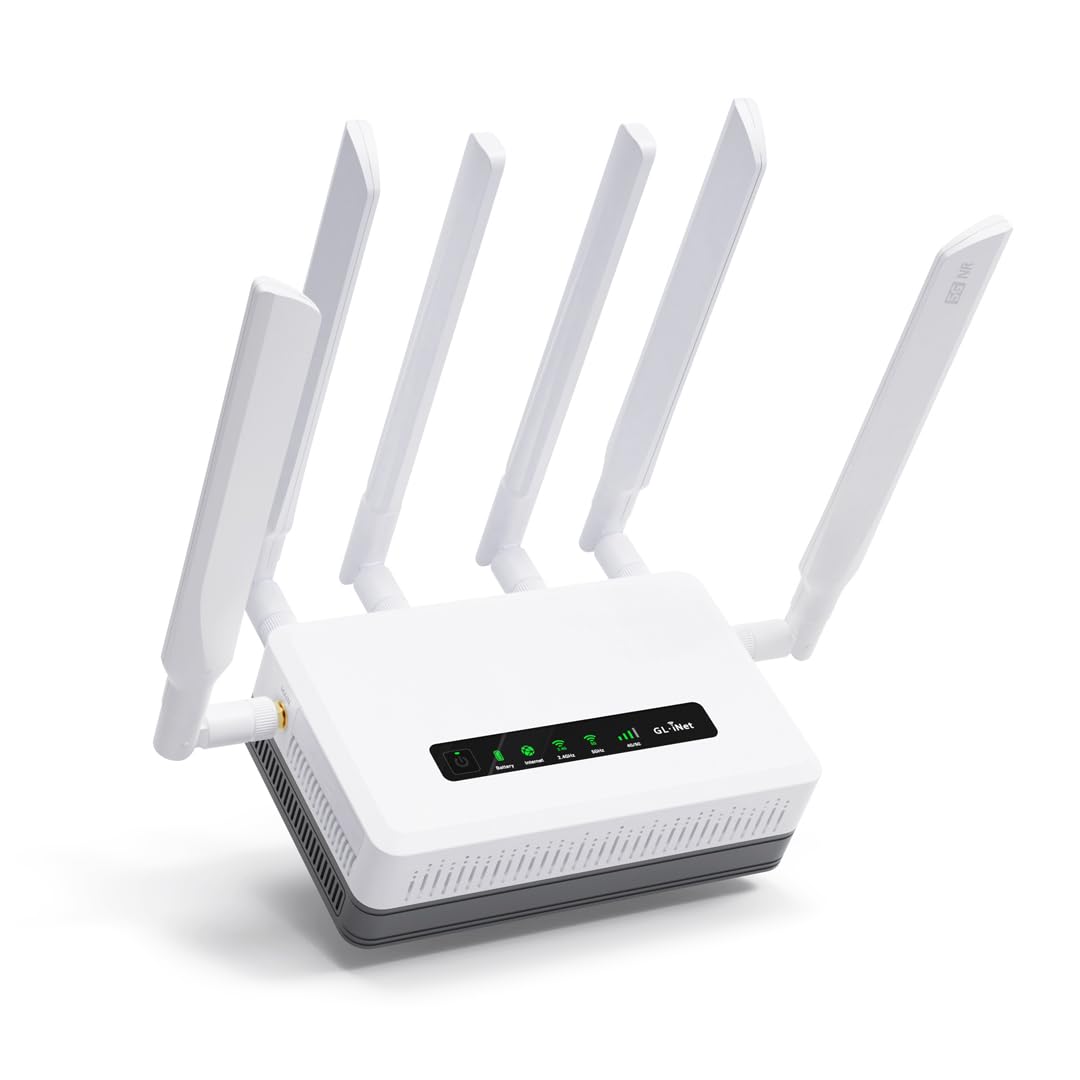
The 5G router that keeps your campsite online even when the power cuts.
The Puli AX is the X3000’s sibling with one major addition: a built-in 6400mAh battery that delivers up to 8 hours of operation on its own. That changes the game for RVers and field workers who need connectivity during power outages or at remote sites without generator power. Like the X3000, it is a dual-SIM 5G router with Wi-Fi 6 (574 Mbps on 2.4 GHz, 2402 Mbps on 5 GHz), OpenWrt-based firmware, support for 30+ VPN services, and detachable antennas for long-range coverage.
Performance is the number one praise among owners — 35 people single it out. One road tripper tested it across Arizona, Idaho, Oregon, Nevada, Utah, and Washington and called it “excellent for remote road trips,” noting better signal and speed than his phone’s hotspot. Setup ranks second (13 positive mentions), with many saying the T-Mobile or Verizon SIM worked within minutes. Battery life gets its own positive category (10 mentions), with real-world reports of 6 to 8 hours of use. The device is noticeably heavier than the X3000 at 761 grams, but that weight is the battery.
The firmware situation is the one controversy: one owner flagged that it runs old OpenWrt 21.02 with proprietary Chinese drivers, claiming botnet malware risk. This is a single report and not corroborated across the broader review set, but it is a valid data point if security paranoia is high. On the price front, several owners call it expensive but worth it — one said “maybe would” be the right price.
If you need the battery backup and plan to use it as a primary connection in an RV or temporary office, the Puli AX is a clear upgrade over battery-less alternatives. If you keep your vehicle running constantly, the X3000 saves cash.
Best for RVers & remote work: the integrated battery keeps devices online through power failures or generator-off hours.
One trade-off: it is the most expensive device here at, and the proprietary OpenWrt firmware raised a security flag from one technical owner.
Grab it if: you live in an RV, work remotely on the road, and need 5G speeds with hours of battery backup.
Think twice if: you always drive with the engine running and want to save money — the X3000 delivers identical speed without the battery at a lower price.
Understanding the Specs
Data Speed (Mbps) vs Wi-Fi Throughput
The headline speed of a hotspot often refers to the Wi-Fi local network speed — for instance, 1200 or 3000 Mbps. That number is how fast the router talks to your phone or laptop in the same car. The internet speed is limited by your cellular plan and tower signal, typically 50 to 300 Mbps on 4G and 200 to 1000+ Mbps on 5G. A high Wi-Fi number means your local network is not the bottleneck, even if your cellular data is slower.
Dual-SIM and Network Failover
A dual-SIM hotspot can hold two nano SIM cards from different carriers. When one carrier’s signal drops (say, T-Mobile in a rural valley), the router automatically fails over to the second SIM (like AT&T). This is a critical feature for cross-country driving. Without it, you are stuck with whichever carrier you chose at sign-up. Some models also support automatic load balancing, splitting data across both carriers for better overall speed.
FAQ
Will any portable hotspot work in a car?
Can I use my phone’s hotspot instead of buying a dedicated device?
Does a car hotspot need a SIM card?
How do I power a hotspot in a car without draining the battery?
Can a car hotspot work in the mountains or rural areas?
What is the difference between 4G LTE Cat4, Cat6, and Cat7 in a hotspot?
How many devices can a car hotspot support?
Is Wi-Fi 6 important for a car hotspot?
What data plan is best for a car hotspot?
Can I leave a Wi-Fi hotspot in my car during summer?
Final Thoughts: The Verdict
For most buyers, the best wi-fi hotspot for a car is the GL.iNet GL-X3000 Spitz AX because it delivers real 5G speeds, dual-SIM failover, Wi-Fi 6, and advanced routing at the right balance of performance and reliability. If you want built-in battery backup for off-power scenarios, grab the GL.iNet GL-XE3000 Puli AX. And for budget-conscious buyers who need a simple 4G router with battery portability, the FIRSTNUM CPE C600C is the most affordable entry point.
How We Picked
We do not accept paid placement. Every pick is matched to a real buyer and a real use-case; we do not hands-on test units.
Sources & Methodology
Specifications: manufacturer listings and product documentation. Review insights: verified customer reviews, as of July 2026. Pricing: not shown on this page (it changes often); check the current price via the retailer link.
As an Amazon Associate, GoCarLife earns from qualifying purchases. This does not affect which products we feature.