
Our readers keep the lights on and the garage heater humming. As an Amazon Associate, I earn from qualifying purchases.
A double-DIN head unit is one of the rare “weekend upgrades” that changes how your car feels every single day. It’s not just a bigger screen. It’s the end of the phone mount wobble. It’s maps that you can actually glance at. It’s hands-free calls that don’t sound like you’re yelling into a cereal box. It’s your music feeling alive again—because the weak link in most cars is the factory source, not the speakers.
But here’s the part most buying guides get wrong: the “spec sheet” is not the experience. Two stereos can both claim CarPlay/Android Auto, Bluetooth, EQ, and “high power”… and yet one feels fast, stable, and confidence-building, while the other becomes a daily irritation (random disconnects, laggy taps, frustrating camera triggers, weird audio behavior, or a microphone that makes you repeat every sentence twice).
This guide is built around the real friction points that show up after the honeymoon phase: how quickly the unit boots when you start the car, how reliable wireless phone linking stays after weeks of commuting, what happens when your cabin is hot, whether the UI layout is “eyes-off friendly,” and how easy it is to tune the sound without becoming an audio engineer.
If you’re here for the best double din car audio, you’re already thinking like a smart buyer: you want the best mix of sound, connectivity, reliability, and install sanity—not just a list of features copied from the listing. So below, you’ll get exactly that: a decision framework, a quick comparison table, and deep dive reviews that focus on how these units behave in real cars, with real wiring, real steering wheel controls, and real daily use.
You’ll see name brands that win with polish and long-term confidence, plus “feature monsters” that punch way above their weight for the money—along with the exact trade-offs so you don’t get surprised after you install it.
How to Choose the Best Double Din Car Audio (Without Regret Later)
A head unit isn’t “good” because it has more bullet points on the box. It’s good because it works reliably, sounds clean, and fits your car and your lifestyle—every day, in every season. The smartest way to shop is to treat this like a system decision: your vehicle, your wiring reality, your phone habits, and your sound goals. Here’s the exact framework I use to filter noise, avoid “feature trap” purchases, and land on a unit you’ll still love after the 500th drive.
1. Start with your “daily pain,” not your dream list
Most people buy a double-DIN because something currently annoys them. Identify that first, because it dictates what matters most.
- “I just need modern maps and music” → prioritize fast boot, stable CarPlay/Android Auto, and a UI that’s easy to tap while driving.
- “My calls sound terrible” → prioritize external mic support, clean Bluetooth behavior, and practical noise control.
- “My system sounds flat” → prioritize EQ flexibility, pre-amp outputs, clean signal, and tuning tools like time alignment.
- “I’m adding amps/subs” → prioritize multiple RCA pre-outs, sub control, and predictable output behavior.
- “I need cameras” → prioritize clean rear camera switching, correct trigger wiring, and (if needed) front camera input.
2. Pick your connectivity style: wired, wireless, or “hybrid”
This is where many buyers misjudge what they’ll enjoy long-term. The convenience of wireless is real—but wired has two advantages: it’s simpler (fewer moving parts), and it charges your phone predictably. Your best choice depends on how you actually drive.
- Wireless CarPlay/Android Auto: best for short trips, errands, and people who hate plugging in. The winning units reconnect fast and don’t stutter.
- Wired CarPlay/Android Auto: best for commuters and road trips. A good cable = stable data + stable charge.
- Hybrid habit: many drivers use wireless for short drives, then plug in on longer drives to keep the battery topped up.
Also pay attention to where the USB lives. Some units have a USB on the face (convenient, but visible); others route USB to the rear (you can mount a clean port in the console, but it’s an extra step during install).
3. Understand “sound quality” beyond marketing watts
If you’ve ever upgraded speakers and still felt underwhelmed, this is why. Your head unit is the source and the brain. “Peak power” numbers are not the same thing as clean, usable output. What matters more is how controllable and clean the signal is.
- EQ depth: more bands (and sane presets) makes it easier to fix harsh tweeters or muddy mids.
- Sub control: a dedicated sub level control is a quality-of-life feature you’ll use constantly.
- Pre-outs: if you plan to add an amp, pre-outs matter. More outputs = more flexibility later.
- Tuning tools: time alignment and crossovers can make a basic system sound “custom” without buying new speakers.
4. Check your “fit reality”: screen size, chassis depth, and dash geometry
Double-DIN is a standard, but your car isn’t. Two common surprises:
- Depth: older vehicles, some trucks, and some dash layouts can be shallow. A short chassis or L-shaped body can save the install.
- Screen overhang: big displays (like 10.1″) can block vents, hazard buttons, climate screens, or knobs.
The cleanest installs happen when you plan the whole stack: dash kit + harness adapter + antenna adapter + steering wheel control solution (if you need it) + camera wiring path. The head unit is only one part of the puzzle.
5. Decide how “OEM-like” you want it to feel
Some drivers want an upgrade that feels factory: quick boot, simple UI, predictable buttons, no weird popups. Others want a feature playground: custom boot logos, video playback, ambient lights, multiple camera inputs, and lots of settings.
- OEM-like preference: choose units known for clean UI and predictable stability (often name brands).
- Feature playground: choose value units with lots of ports, customization, and included cameras—just be honest about trade-offs like UI polish.
6. Microphone quality is not a small detail (it’s the deal)
This is one of the biggest “surprise disappointments” in head units. Music can sound fine, and CarPlay can look great… but if calls are rough, you’ll resent the unit daily. Here’s what matters:
- External mic support: allows better placement (A-pillar or headliner area) and often improves clarity.
- Bluetooth stability: the best units reconnect quickly and don’t “half-connect” (music works, calls don’t).
- Noise handling: loud vehicles expose weak mics and weak processing quickly.
7. Don’t fall into the “camera wiring trap”
Rear cameras are amazing—until they aren’t. Most problems are wiring, not the camera itself. The key is the reverse trigger wire: it needs clean power from your reverse light circuit (or a proper trigger signal in some vehicles). If you’re adding a camera, plan the cable route early so you’re not trying to fish wires through tight grommets at the end.
8. The smartest way to buy: choose your tier first
To keep this simple, I like to sort head units into three “buyer tiers”:
- Tier A — Stability first: for drivers who want it to feel factory and just work.
- Tier B — Feature-first value: for drivers who want maximum features per dollar (and can accept some polish trade-offs).
- Tier C — Simple upgrade: for drivers who don’t need CarPlay/Android Auto, but want modern Bluetooth, good sound, and a clean screen.
Quick Comparison: 15 Best Double Din Car Audio Picks
Use this table to shortlist the models that match your priorities, then jump to the full reviews for the “real life” details— like boot speed, call clarity, connection stability, camera behavior, and whether the UI feels fast or fiddly.
On smaller screens, swipe or scroll sideways to see the full table.
| Model | Category | Standout strength | Best match | Amazon |
|---|---|---|---|---|
| Pioneer DMH-1600NEX | Balanced daily driver | Clean brand feel + practical sound tuning; great “live with it” experience | Drivers who want a stable, sound-first upgrade without gimmicks | Amazon |
| Pioneer DMH-W2770NEX | Premium wireless | Wireless + wired phone integration with a short chassis for easier installs | Buy-once shoppers who want wireless convenience with name-brand confidence | Amazon |
| JVC KW-M590BT | Call clarity + fit | L-shaped chassis + strong EQ/time alignment tools for smoother installs and cleaner sound | Vehicles with tight dash space; drivers who care about voice clarity and tuning | Amazon |
| 10.1" QLED Double Din (Kissound) | Big-screen value | Huge QLED display + ambient light bar + dual camera support | Trucks/SUVs where a larger screen won’t block controls | Amazon |
| Pioneer DMH-130BT | Simple + solid | Bluetooth-focused head unit with a clean look and backup camera readiness | Drivers who don’t need CarPlay/Android Auto but want reliable daily basics | Amazon |
| SJoyBring 7" QLED (Dash Cam + Backup Cam) | Safety bundle | QLED screen + dash cam + backup camera in one setup | Drivers who want a “one box” safety-and-infotainment upgrade | Amazon |
| BOSS BVCP9700A-C (with Backup Camera) | Value + camera | Big-screen CarPlay/Android Auto experience plus a camera included | Budget buyers who want a known brand with a ready-to-go camera kit | Amazon |
| BOSS BVCP9700A | Value brand pick | Large, readable UI + CarPlay/Android Auto without the premium price vibe | Drivers who want modern phone integration and a known warranty story | Amazon |
| JENSEN J1CA7 | Certified basics | Clean interface + practical pre-outs; strong “no drama” option for many vehicles | Buyers who want a simple, readable screen and straightforward wired phone integration | Amazon |
| PLZ 7" Wireless Double Din (B0FQNPGQ6Z) | Feature-rich value | Wireless CarPlay/Android Auto + DSP + dual sub outputs | Feature hunters who want lots of tuning and connectivity in one unit | Amazon |
| PLZ 7" Wireless Double Din (B0CFL3MFXF) | Feature-rich value | Similar PLZ “max features” DNA with wireless phone linking and camera support | Drivers who like customization (boot logos/firmware support) and many ports | Amazon |
| SJoyBring 7" QLED (Wireless CP/AA, Backup Cam) | Balanced budget | QLED display + wireless phone integration + dual sub outputs | Budget shoppers who still want the “nice screen” feeling | Amazon |
| SJoyBring 7" QLED Double Din (B0CT5P32L7) | Budget upgrade | Strong “everyday” wireless experience with a clean look and practical controls | Drivers upgrading older cars who want modern features without premium pricing | Amazon |
| BOSS BV9358B | Classic value | Proven “does a lot for the money” reputation with camera + media support | Drivers who want a mature feature set and don’t mind a more old-school UI | Amazon |
| 7" Double Din (Kissound) | Lowest-cost modernize | Wireless CarPlay/Android Auto + camera support at entry-level commitment | Budget upgrades, older cars, and “I just want it modern” buyers | Amazon |
In‑Depth Reviews: 15 Double‑DIN Head Units That Feel Great in Real Cars
Now we’ll go model by model. I’m going to talk like a daily driver and installer—not a spec sheet: what feels smooth, what feels fiddly, what owners tend to praise after months of use, and what you should plan for before you commit (harnesses, dash kits, camera wiring, and steering wheel controls).
1. Pioneer DMH-1600NEX – The “Daily Driver” Head Unit That Nails the Basics

The DMH-1600NEX is the kind of unit that makes you forget you installed an aftermarket stereo—because it behaves like it belongs there. That’s the real “best overall” vibe: stable phone linking, a screen that’s responsive enough to trust at a stoplight, and sound controls that don’t make you feel like you’re hacking your way through hidden menus.
Where it wins in real life is predictability. Owners consistently describe solid Bluetooth behavior and a layout that’s easy to learn. That matters because the best head unit isn’t the one you admire once—it’s the one you operate a thousand times without friction. The included external microphone is a meaningful detail here too: your call clarity is far more dependent on mic placement and processing than most people realize, and a properly mounted external mic can make your hands-free experience feel “new car,” not “afterthought.”
For sound, Pioneer’s tuning approach is practical: a multi-band EQ gives you enough control to tame harshness or add body without wrecking clarity. The trick with units like this is that they often make stock speakers sound better simply by feeding them a cleaner, more controllable signal. You’re not just getting a screen—you’re improving the source quality.
The one place to be realistic: the “ecosystem” stuff. If you want maximum integration (vehicle gauges, advanced data screens, factory features piped into the head unit), that often lives in add-on modules and harnesses depending on your car. But if you want a head unit that does the core modern job—clean screen, modern phone integration, real tuning tools—the DMH-1600NEX is a strong anchor choice.
Why you’ll like it
- Feels OEM in daily use – fast enough, clean enough, predictable enough that it doesn’t feel “cheap.”
- Practical sound tuning – EQ flexibility helps you fix the common “too bright / too muddy” factory sound problem.
- External mic support – gives you a real shot at crisp hands-free calls when installed thoughtfully.
- Good long-term ownership vibe – many owners describe “set it and forget it” behavior after install.
Good to know
- Car integration (steering wheel controls, advanced data) can depend on your vehicle-specific adapters and modules.
- If you’re allergic to plugging in, you may prefer a model built around wireless-first behavior.
- Like most head units, the install experience is 80% prep work (harness + dash kit + antenna adapter).
Ideal for: drivers who want a polished, sound-first upgrade that feels stable and “normal” every time they start the car.
2. Pioneer DMH-W2770NEX – Wireless Convenience with Name‑Brand Confidence

If your dream is “I start my car and my phone is already there,” the DMH‑W2770NEX is the kind of unit that makes wireless feel worth it. The quality of wireless matters more than the existence of wireless. A unit can technically connect… while still feeling inconsistent, slow, or annoyingly fragile. The goal is connection that feels automatic, not connection that feels like you have to babysit it.
This is also one of those models that can save an install that would otherwise be miserable. A short chassis doesn’t sound exciting, but it can be the difference between “everything fits cleanly” and “I’m shoving wires into a tiny cave and hoping the screen sits flush.” For older trucks, tight dashboards, or vehicles with awkward radio pockets, shallow depth is a practical superpower.
Sound-wise, you’re buying into a brand that usually gives you predictable tuning and stable output behavior. That matters if you plan to add an amplifier later: you want a head unit that behaves consistently when you adjust volume, fade, balance, and sub level. In real installs, that consistency is what keeps you from chasing random pops, weird level changes, and hard-to-explain distortion.
The premium appeal is simple: you’re paying for fewer surprises. Not “more features,” but a more confident day-to-day experience. If you’re the type of driver who hates fiddling, this is a strong choice.
Why it’s worth the upgrade
- Wireless feels “built-in,” not bolted on – when it’s good, it changes how you use your car daily.
- Short chassis helps real installs – especially in older dashes or vehicles with limited radio depth.
- Strong brand polish – menu design and tuning tools tend to feel consistent and usable.
- Great foundation for upgrades – a clean head unit makes future amps/speakers feel more rewarding.
Good to know
- Wireless convenience can reveal weak charging habits—many drivers still plug in on longer trips.
- If your car needs steering wheel controls or factory integration, plan your adapters before install day.
- Premium units still need clean wiring; sloppy ground work creates problems no brand can “fix.”
Ideal for: drivers who want a buy-once wireless upgrade with a clean, confident, name-brand feel.
3. JVC KW‑M590BT – The “Fits Where Others Don’t” Pick (With Serious Tuning Tools)

The JVC KW‑M590BT is a “problem solver” head unit. Some cars don’t give you a friendly radio cavity—depth is tight, wiring space is cramped, and a normal chassis turns the install into a wrestling match. An L‑shaped or short-style chassis can be the difference between a clean install and an afternoon of frustration. That’s the quiet genius of this unit: it’s designed to play nice with real dashboards.
The second reason it deserves attention is tuning. A 13‑band EQ plus time alignment and digital time alignment features put it in a category that goes beyond basic “bass/treble.” This is the stuff that makes your speakers sound like they’re working together instead of arguing. Time alignment is especially powerful in cars because you sit closer to one speaker than the other; with tuning, you can pull the image back to the center so vocals feel “in front,” not stuck in the door.
Call clarity is another practical advantage when a unit supports better Bluetooth profiles and external mic solutions. If you’ve ever had a head unit that makes your voice sound thin or distant, you learn quickly that hands-free quality isn’t optional—it’s a daily feature. This JVC leans into that “usable” experience: clear enough controls, a screen that’s readable, and audio tools that let you adapt to your cabin.
The main trade-off to understand is phone connection style. Some drivers want wireless by default; others are perfectly happy with wired CarPlay/Android Auto because it charges and stays stable. If you’re a commuter or road tripper, wired can actually feel more “grown up.”
Why it stands out
- Dash-fit friendly chassis – helps in older cars and tight radio cavities.
- Serious tuning tools – EQ + time alignment can make stock speakers sound shockingly better.
- Great for “build a system later” – a strong source pays off when you add amps or better speakers.
- Voice-friendly approach – good call behavior matters more than most buyers expect.
Good to know
- If you’re committed to wireless-only life, double-check your preference and habits before buying.
- Steering wheel controls often require a vehicle-specific adapter; plan for it.
- Like many name-brand units, the “clean experience” assumes a clean install (proper ground, tidy harness work).
Ideal for: vehicles with tight dash space, and drivers who want sound tuning that actually moves the needle.
4. Kissound 10.1" QLED – The “Truck Tablet” Upgrade That Feels Shockingly Modern

A 10.1" screen changes the whole vibe. It’s not “a stereo with a screen” anymore—it’s a dashboard centerpiece. And when you do a lot of navigation, towing, or long drives, the bigger display isn’t just cool; it’s easier and safer to glance at. But the big screen is also where you must be honest about your vehicle layout. This style of unit can overhang beyond the double-DIN opening, so you need to check whether it blocks vents, climate controls, or factory screens.
What owners tend to like about this unit is the “it boots and it works” energy. When wireless Android Auto/CarPlay connects reliably and the touch response feels snappy, the unit starts to feel premium even if it’s priced like a value buy. Small details become big wins: a volume knob you can grab without looking, a screen that’s bright enough to see in sunlight, and a layout that you can learn quickly.
For sound, the dual sub outputs and DSP/EQ style features matter because they let you build a system in phases. Many people start with the head unit, then add a small under-seat sub or a trunk sub later. When your head unit has clean sub control and predictable outputs, that future upgrade is smoother and more satisfying.
The “light bar” is polarizing, and that’s okay. Some drivers love the visual energy. Others turn it off immediately because they want a clean, factory look. The important part is that you’re not forced into it—you can treat it as a fun feature, not the identity of your dash.
Why people love it
- Big-screen navigation is addictive – once you live with it, small screens feel cramped.
- Volume knob is a real win – tactile control matters while driving.
- Future system-friendly – dual sub outputs and tuning options support gradual upgrades.
- Modern feel in older vehicles – instantly updates the “tech age” of your interior.
Good to know
- Fit is everything: confirm your dash layout so the big screen doesn’t block important controls.
- No dedicated home button can be a workflow annoyance for some drivers (learn the shortcut behavior early).
- Android Auto can override local media workflows—plan how you want to listen day-to-day.
Ideal for: trucks and spacious dashboards where a larger screen won’t block vents or buttons, and drivers who want a “new car” cockpit feel.
5. Pioneer DMH-130BT – For Drivers Who Want Bluetooth + Clean Sound (No Phone Ecosystem Drama)

Not everyone needs CarPlay or Android Auto. Some drivers want a modern screen, reliable Bluetooth, and a clean backup camera input—and they want it without the “app ecosystem” complexity that can come with certain phone-link systems. That’s where the DMH‑130BT shines: a straightforward daily upgrade with a name-brand feel.
If your current setup is old-school (CD deck, no Bluetooth, weak tuning), this kind of unit can make your car feel “current” again without demanding that you change how you drive. Pair your phone, stream music, take calls, and enjoy a more modern interface. It’s not trying to be a rolling smartphone; it’s trying to be a clean, usable stereo that upgrades your daily life.
The real advantage here is fewer moving parts. When you remove the phone-projection layer, you remove a lot of potential frustration: cable quirks, app update weirdness, and disconnect behaviors. For some buyers, that simplicity is a feature, not a limitation.
This is also a smart choice if your vehicle is a second car, a work truck, or a “keep it simple” build. You can still improve the sound, add a camera, and enjoy a modern display without turning your dash into a tech experiment.
Why it makes sense
- Simple daily behavior – Bluetooth streaming and hands-free calling without extra complexity.
- Clean brand experience – feels more predictable than many ultra-budget units.
- Backup camera readiness – a meaningful safety upgrade with the right wiring.
- Great for “second vehicle” upgrades – modernizes without over-investing.
Good to know
- No CarPlay/Android Auto means navigation stays on your phone or via Bluetooth audio prompts.
- Install prep still matters: harness, dash kit, antenna adapter, and clean grounding.
- If you want wireless phone projection, jump to the wireless-focused picks instead.
Ideal for: drivers who want reliable Bluetooth and a modern screen, and who value simplicity over phone-projection features.
6. SJoyBring 7" QLED (Dash Cam + Backup Cam) – One Box That Makes an Older Car Feel New

This is the kind of product that makes sense when you want a single purchase to solve multiple “modern car” features at once: a sharper screen, wireless phone integration, a backup camera, and even a dash cam. That bundle approach is attractive because install work is the painful part. If you’re already pulling panels and routing wires, you may as well get multiple wins out of the project.
The QLED display is a big part of the appeal. A good screen doesn’t just look pretty; it changes usability. Bright, crisp screens reduce squinting and make navigation and camera views feel more trustworthy. Add physical buttons (especially a volume control), and you get the best combination: touch for maps, tactile for quick adjustments.
Where these “value feature bundles” tend to shine is in how much they include: multiple pre-outs, sub outputs, camera support, and a UI that feels modern enough for daily use. Owners often mention that installation is straightforward when you use the correct dash kit and harness, and that the included cameras are “actually usable” rather than cheap throw-ins.
Here’s the expert lens: treat it like a system. If you mount the dash cam cleanly, route the wires thoughtfully, and place the microphone intelligently, you can end up with a setup that feels premium. If you rush the wiring and shove everything into the dash, you’ll get intermittent weirdness that isn’t the unit’s fault—it’s the environment you created behind the dash.
Why it’s a smart bundle
- Two safety upgrades in one – dash cam + backup camera can be a huge quality-of-life boost.
- QLED screen looks “expensive” – sharp maps and clearer camera image.
- Physical controls help while driving – volume knobs/buttons reduce screen poking.
- Audio outputs support upgrades – good if you plan to add a sub or amp later.
Good to know
- Dash cam wiring is extra work—plan power routing and cable management before you start.
- As with many value units, UI “feel” can vary; spend time dialing in settings early.
- MicroSD card requirements and formatting matter for dash cam reliability.
Ideal for: drivers modernizing an older car and wanting a single upgrade that improves both daily convenience and safety.
7. BOSS BVCP9700A‑C – A Known Brand “All‑Set” Kit (Big Screen + Backup Camera)

If you want a value pick that still feels like a “real brand purchase,” the BVCP9700A‑C kit is a strong candidate because it reduces one of the most annoying parts of upgrading: hunting for a camera that plays nicely with your unit. With a bundle, you’re building a more predictable install.
The screen size and icon layout matter more than people admit. Big touch targets are safer. A readable interface reduces distraction. Owners often highlight that CarPlay features (music, navigation, messaging) are what truly change the driving experience—especially in older cars that never had modern connectivity. Even when a unit has a tiny delay on taps, the overall improvement compared to factory stereos can be massive.
Audio-wise, this kind of unit is often a “bridge” between stock and upgraded. It gives you multiple outputs so you can expand later. That matters because most people upgrade in stages: head unit now, speakers later, sub after that. A unit that supports that growth is more satisfying.
The caution is microphone expectations. Many value units include a mic that works, but not beautifully. The best results come from good mic placement, and sometimes from using an external mic option if your unit supports it. Treat it like part of the install, not an afterthought.
What it does well
- Bundle convenience – backup camera included so you’re not mixing random gear.
- Readable UI – big screen and large controls are easier to live with.
- Expandable outputs – front/rear/sub pre-outs support future upgrades.
- Good “modernize my car” impact – adds the features people actually use daily.
Good to know
- Some users dislike button-only volume controls; check if you prefer a knob.
- Occasional reboot or startup quirks can happen in value units—install quality and power stability help.
- Steering wheel controls usually require a separate interface module.
Ideal for: buyers who want a recognizable brand, a big screen, and a camera-ready upgrade without chasing parts.
8. BOSS BVCP9700A – Modern Phone Features Without the Premium Price Vibe

The BVCP9700A is popular for one reason: it gives a lot of modern functionality without asking you to spend like you’re building a show car. For many drivers, the winning features are simple: CarPlay/Android Auto for navigation and music, Bluetooth for calls, and a big screen that makes everything feel easier. That’s the true upgrade—less friction, more clarity.
In real use, two quirks show up often in this class of unit. First, interface speed: some people notice a slight delay when tapping menus. Second, volume control ergonomics: if you’re a “must-have knob” person, button-only volume can annoy you more than you expect. The good news is that these are personal preference issues, not “the unit doesn’t work” issues.
One of the best ways to get a premium feel out of a value unit is to treat the installation as part of the product. Use a proper harness adapter (so you’re not hacking factory wiring), mount the microphone thoughtfully, and secure the unit tightly so it doesn’t vibrate or flex. When owners do that, they tend to report a much more satisfying experience.
Another practical benefit: these units can make older vehicles feel younger overnight. A 2010-era car with no Bluetooth music becomes a “modern” car when you drop in a double-DIN with phone projection. That’s why this model is such a common upgrade for older sedans and trucks.
Why it’s popular
- High impact upgrade – adds the modern features most drivers use constantly.
- Big, readable screen – easier navigation and safer glance behavior.
- Expandable outputs – supports front/rear/sub pre-outs for growth.
- Brand warranty story – many buyers prefer a known warranty vs unknown sellers.
Good to know
- No volume knob can be a dealbreaker if you adjust volume constantly.
- Mic quality varies; placement is critical for call clarity.
- Some users report occasional resets—stable wiring and good power connections reduce issues.
Ideal for: drivers who want modern phone features on a big screen without paying premium-brand pricing.
9. JENSEN J1CA7 – A Straightforward, Readable Upgrade (With Practical Audio Outputs)
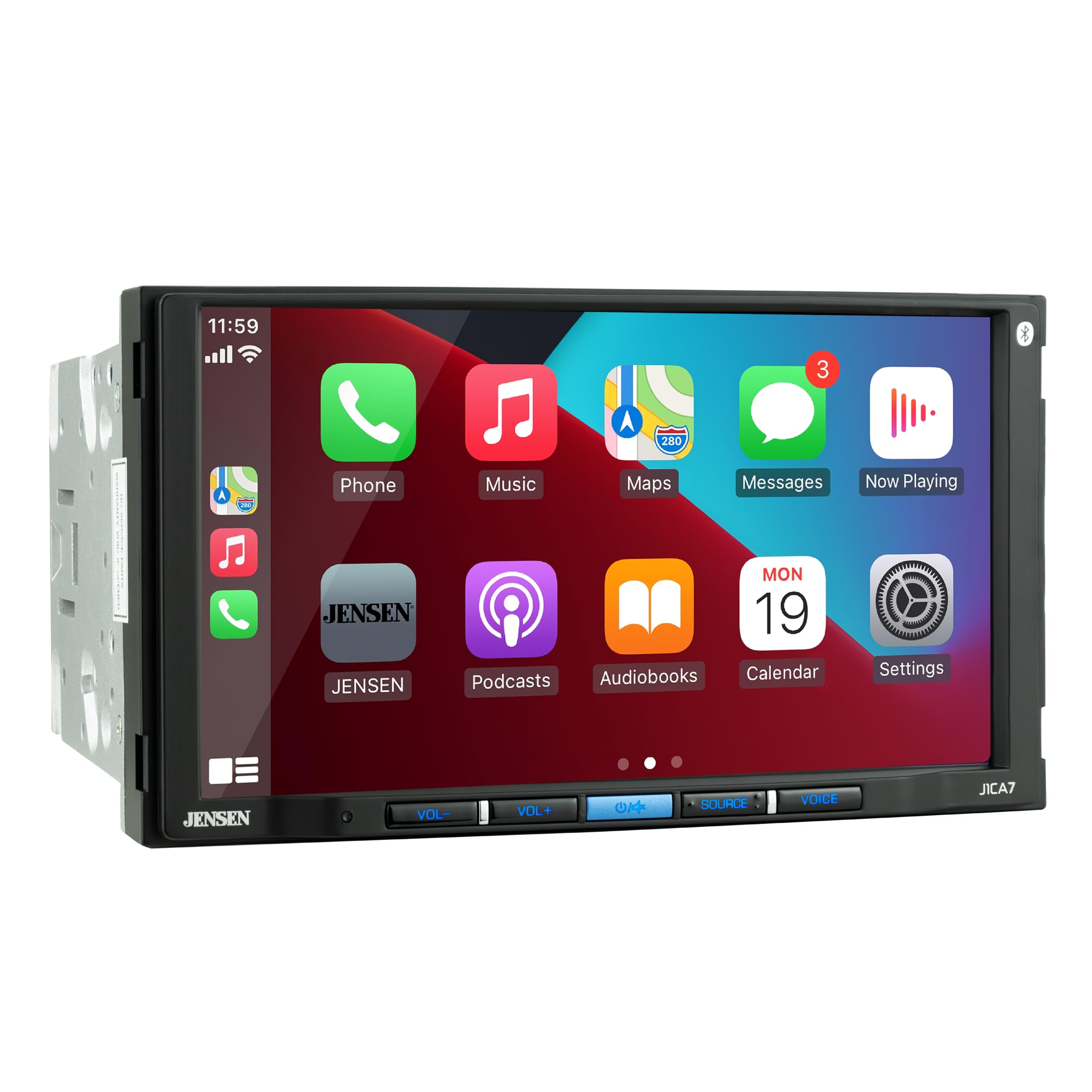
The Jensen J1CA7 is a good example of a unit that aims for “clear and usable” rather than “flashy and complicated.” A lot of drivers simply want a modern interface that doesn’t feel overwhelming, with reliable phone integration and sensible audio controls. Jensen tends to appeal to that buyer: the person who wants a recognizable brand at a reasonable commitment level.
A key point for the sound-focused buyer: pre-outs matter. When a head unit gives you front/rear/sub pre-outs, it’s saying, “You can expand this later.” Even if you don’t add an amplifier now, that option can extend the life of your head unit choice. Many people upgrade speakers and add a sub later; the J1CA7 can support that growth.
Where you want to be careful is filtering and crossovers. Some owners care deeply about having high-pass filters to protect door speakers from low bass. If you run speakers off the head unit power and also add a sub, having a high-pass is useful because it prevents your door speakers from wasting power trying to play bass they can’t reproduce cleanly. If your install plan includes a sub, crossovers become a real-world feature, not an audio nerd feature.
The Jensen is a strong pick when you want a functional, readable screen and a simple interface that doesn’t require a manual to operate. It’s not trying to be the most exotic unit—it’s trying to be a dependable daily upgrade.
Why it works
- Easy-to-learn interface – the “my whole family can use it” kind of UI.
- Pre-outs for growth – front/rear/sub outputs support future amplifiers and subs.
- Readable display – big screen and clear layout reduces distraction.
- Brand familiarity – many buyers feel more comfortable with established brands.
Good to know
- Advanced crossover controls can be limited in some setups; plan if you’re building a sub + speaker system.
- Mic tuning and camera flip settings are worth checking for your specific install needs.
- As always, steering wheel controls typically require an adapter module.
Ideal for: drivers who want a clean, simple interface with room to grow via pre-outs.
10. PLZ 7" Wireless Double Din (B0FQNPGQ6Z) – The “Feature Monster” With Real Install Support
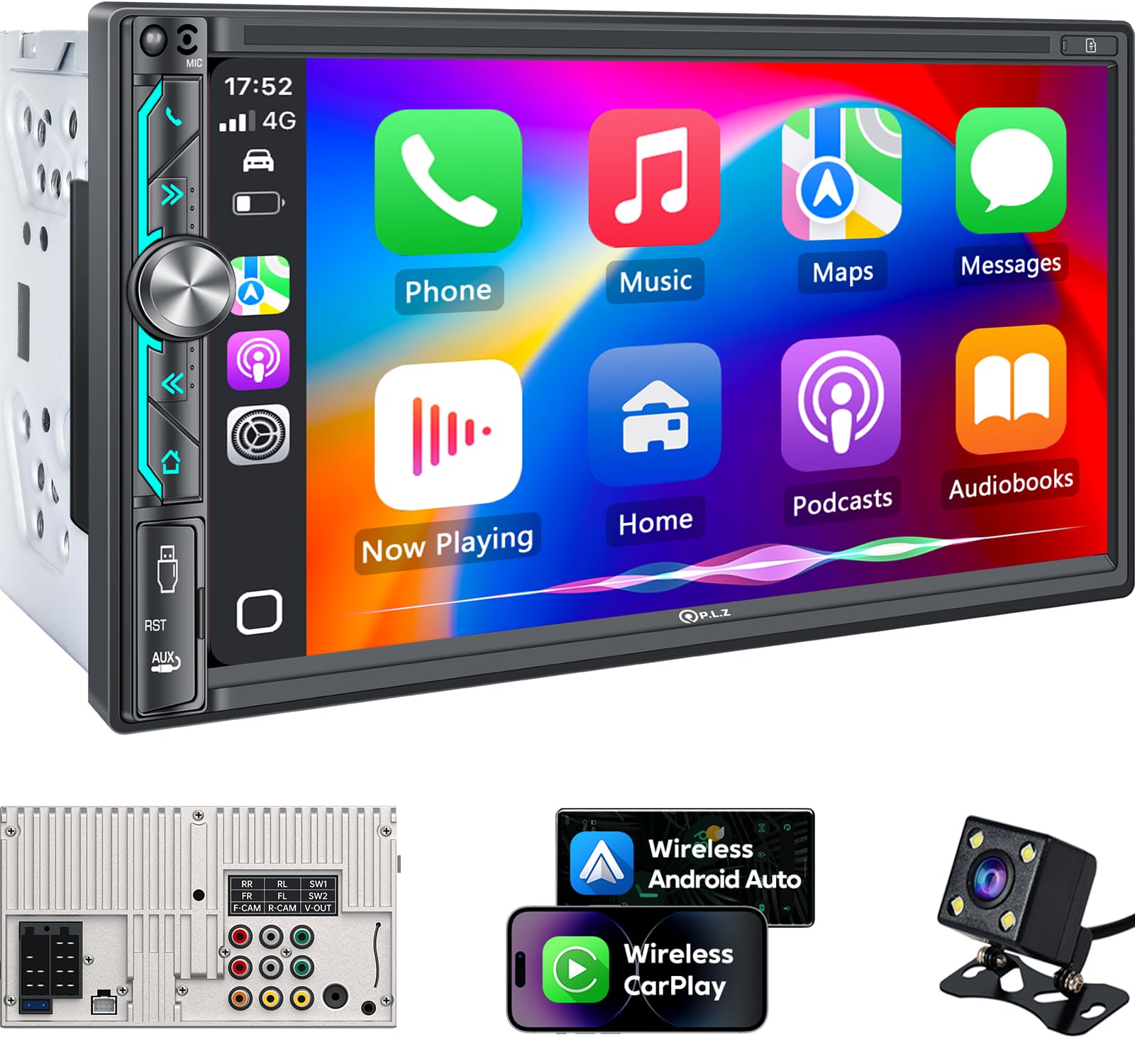
PLZ has built a reputation in the value space by doing something many budget units don’t do well: they attempt to support the install. That sounds boring—until you’ve installed a unit with vague wiring labels, unclear instructions, and “good luck” documentation. Owners repeatedly mention that a clear manual and responsive support makes the difference between a frustrating install and a smooth one.
The headline features are exactly what feature hunters want: wireless phone integration, DSP tuning, multiple audio outputs (including dual sub outputs), and a screen that’s bright enough to feel modern. The DSP and EQ controls can be a big deal because they let you shape the sound to your car instead of accepting factory acoustics. If your cabin has a harsh top end (common with bright tweeters) or boomy midbass (common in some doors), a good EQ is how you “fix” it without buying new speakers.
Real-world feedback on units like this tends to cluster into two themes: “amazing for the money” and “audio quality isn’t premium.” Both can be true. The key is deciding what you need. If you want maximum features and you’re okay with a “good” sound signature rather than a truly refined one, this can be a very satisfying purchase. If you’re extremely sensitive to call audio or navigation voice quality, you may want a more polished unit.
One smart move with PLZ-style units is to treat your microphone setup like a real part of the build. Use an external mic if available, mount it in a good location, and test call clarity before you reassemble the dash. It’s the quickest way to avoid regret later.
Why it’s compelling
- Huge feature set – wireless phone projection + DSP + lots of outputs.
- Install support – better documentation and responsiveness than many budget competitors.
- Sound shaping – EQ/DSP tools help you adapt to your car’s acoustics.
- Strong “modernize my car” payoff – feels like a major tech leap in older vehicles.
Good to know
- Some users report call or navigation audio quirks; test your most-used functions early.
- Wireless convenience can expose weak factory speakers; tuning helps, but premium sound may require upgrades.
- Dash fit and bracket alignment can require minor creativity depending on vehicle.
Ideal for: feature-focused buyers who want wireless connectivity, DSP tuning, and lots of outputs without premium pricing.
11. PLZ 7" Wireless Double Din (B0CFL3MFXF) – Similar Power, Different “Feel”

Think of this PLZ model as a sibling to the feature-heavy unit above: similar DNA, similar goals, but the day-to-day experience can feel different. That’s normal in the value category. Small differences—Bluetooth behavior, mic quality, the way navigation voice mixes with music, how the EQ behaves—can make one model feel “right” for your habits and another feel slightly off.
What owners often praise here is the install experience when it’s done with the right harness and dash kit. Several users describe installs that go smoothly once they match the wires carefully and use proper adapters. That’s a theme you’ll see across this entire guide: the head unit is only as good as the preparation around it. A “bad” install can make a great unit look unreliable. A “good” install can make a value unit feel premium.
This unit also highlights a reality about budget wireless head units: sometimes music sounds fine, but calls or navigation voice can reveal weaknesses. That doesn’t always mean the unit is “bad.” It can be a combination of factory amps, speaker sensitivity, mic placement, and the unit’s processing. If your job involves calls (delivery driving, sales, commuting), this is worth testing immediately after installation.
The right buyer for this unit is someone who values wireless convenience and a full feature set, and who is comfortable spending a little time dialing in audio settings to match their car.
Why it’s attractive
- Wireless phone integration – a big daily convenience when it reconnects reliably.
- Strong feature set – DSP, EQ, mirror link, and sub outputs for system flexibility.
- Good “first double-DIN” energy – often feels like a massive upgrade from factory.
- Support path exists – firmware/logo customization workflows appeal to tinkerers.
Good to know
- Call audio can be more sensitive than music audio—test calls and navigation prompts early.
- Sub wiring choices affect behavior; follow a clean RCA plan to avoid pops and surprises.
- Mirror link can be limited by app restrictions (some streaming apps block mirroring).
Ideal for: drivers who want lots of features and wireless convenience, and who don’t mind spending time optimizing settings.
12. SJoyBring [QLED Upgrade] 7" Double Din (B0CWRM74FR) – Crisp Screen, Easy Daily Flow

If you want a budget-friendly unit that still looks and feels “nice,” a QLED display is a great place to spend your money. A sharper screen improves your experience constantly: maps are clearer, camera views look more trustworthy, and the UI feels more modern. This model sits in the sweet spot for buyers who want the wow factor of wireless phone integration without paying premium-brand pricing.
What makes a unit like this satisfying is the combination of features and the “learnability” of the interface. Owners often mention that setup is quick once installed, that Android Auto/CarPlay works smoothly, and that the unit can be customized quickly. That matters because the best head unit is the one that doesn’t demand a relationship. You want to install it, configure it, and then just drive.
There are two “value unit realities” to keep in mind. First, wireless behavior can vary depending on your phone model and how often you do quick restarts. Second, boot logo customization and firmware updates sometimes require an extra process through support—fun if you like tinkering, annoying if you don’t. Neither is a dealbreaker; they’re just part of the category.
If your goal is a modern cockpit with clear visuals, wireless phone features, and enough outputs to add a sub later, this is a very compelling pick.
Why it’s a good buy
- QLED screen advantage – clearer visuals make daily driving feel more “new car.”
- Wireless phone convenience – quick access to maps, music, and calls.
- Upgrade-ready outputs – sub outputs support a future bass upgrade.
- Fast learning curve – many users describe an intuitive UI.
Good to know
- Firmware/logo workflows can take extra steps; decide if you care about customization.
- As with most value units, call quality depends heavily on mic placement.
- Some vehicles need additional adapters (dash kit, harness, antenna adapter) to install cleanly.
Ideal for: buyers who want a crisp screen and wireless phone features with a balanced budget mindset.
13. SJoyBring 7" QLED Double Din (B0CT5P32L7) – The “Reliable Enough to Buy Again” Type

One of the strongest signals a product is “good enough” is when buyers purchase it multiple times for multiple vehicles. This SJoyBring model often lands in that category: it may not be a boutique audio component, but it delivers the features that matter most for daily driving—wireless phone integration, a clean-looking screen, and enough audio control to make the system enjoyable.
A realistic way to think about this unit is: it’s a modern infotainment upgrade that doesn’t pretend to be a competition-level audio source. Owners describe it as intuitive, quick enough in daily use, and stable enough that it doesn’t turn into a constant troubleshooting project. That’s the real goal for most buyers.
There are also honest limitations that tend to show up across budget units: microphone quality can be a weak point, and absolute max volume may not satisfy drivers who want “concert loud” in loud vehicles. If you drive a quiet car, you might love it. If you drive an old diesel truck, you might want more power, an amp, or a different tier of head unit.
The best experience comes when you pair it with realistic expectations: let it be a modern screen + phone unit, and if you want serious sound later, use its outputs to add a small amp or sub. That staged upgrade plan is exactly how most people build systems over time.
Why it’s loved
- Wireless convenience – quick access to navigation and music changes your daily drives.
- Good screen for the money – crisp visuals give a more premium feel.
- Feels intuitive – many users don’t need a manual to navigate it.
- Good upgrade platform – dual sub outputs support future bass additions.
Good to know
- Call clarity depends on mic placement and cabin noise; test it before closing the dash.
- Max loudness expectations vary—amp users may want a stronger source or external amplification.
- AM reception can be weaker than factory units in some vehicles; FM tends to be more forgiving.
Ideal for: budget-minded upgrades where modern features matter most, and “good daily behavior” beats chasing perfection.
14. BOSS BV9358B – The Old‑Reliable Feature Stack (With Real Warranty Follow‑Through)

The BV9358B has a “classic value” vibe: it’s been around long enough to have a well-known reputation, and it tends to deliver a lot of useful features at a level many buyers find more than acceptable. It’s the kind of unit that people install when they want modern phone integration, camera support, and media flexibility without turning the purchase into a big research project.
What’s interesting about this model is the support story you sometimes see: when a unit fails or locks up, some users report that warranty support handles replacements in a way that keeps them on the road. That matters because value buys feel risky when the support ecosystem is weak. A unit that’s “good enough” with decent support can be a smarter choice than a cheaper unit with zero backup.
The user experience is typically a little more old-school: screen resolution and UI polish may not feel like premium brands, and little quirks like touchscreen beep sounds or format compatibility can appear. But if your priority is “lots of features + good value,” these are the kinds of trade-offs many buyers accept happily.
This is also a good pick if you like tinkering—playing media from cards/drives, customizing settings, and building a flexible setup. Just remember: plan your file formats and camera wiring early, and you’ll avoid 90% of frustration.
Why it’s a value staple
- Feature-rich for the money – hits many “modern car” checkboxes.
- Practical camera support – works well when wired correctly with a clean trigger.
- Media flexibility – useful for drivers who like local playback options.
- Warranty follow-through – support experiences can be a real deciding factor in value tiers.
Good to know
- UI and screen resolution can feel less refined than premium units.
- Touchscreen sounds and format quirks may require menu digging and file conversion.
- As with many installs, steering wheel controls need an adapter module in most vehicles.
Ideal for: value-minded buyers who want a proven feature stack and are okay with a more old-school UI feel.
15. Kissound 7" Double Din – The “Cheap but Surprisingly Capable” Modern Upgrade

This is the kind of unit that makes you do a double take: wireless phone features, sub output, camera support, and a modern screen—at entry-level commitment. The appeal is obvious: if your car is old and your factory stereo is painful, this can modernize your daily drive fast without feeling like a risky investment.
Owners often describe these units as “better than expected,” especially when installed with proper harnesses and dash kits. The key is that you’re buying a package of modern usability: navigation on the screen, music apps, hands-free calling, and a backup camera view that can dramatically improve parking confidence. Even if the unit isn’t “audiophile grade,” it can still be a massive upgrade over stock.
The expert lens is to be honest about the trade-offs. Entry-level units can show limits in CPU speed (some lag), power output consistency, and long-term polish. But if your goal is not perfection—your goal is simply modern features and a better daily experience—this can be a very satisfying purchase.
A smart strategy here is to install it cleanly, tune it gently, and use it as the center of a staged upgrade plan. If you want more sound later, add a small amp or a powered sub. Your head unit becomes the interface and the brain; the external amp becomes the muscle.
Why it’s a smart cheap upgrade
- Modern features at entry-level commitment – wireless CP/AA is the biggest daily win.
- Backup camera included – immediate safety and convenience upgrade.
- Shallow install friendliness – can work well in cars with limited dash depth.
- Low theft anxiety – some buyers like not having a high-end unit visible in older cars.
Good to know
- Power claims can be optimistic; loudness and clarity may not match premium brands.
- Some lag or skips can happen under wireless load; wired use can stabilize behavior.
- Support quality varies by seller—do your setup carefully and test everything before reassembly.
Ideal for: budget upgrades where modern phone features matter most, and you want the “biggest improvement per dollar.”
The Power‑User Section: Install Like a Pro & Tune Like an Expert
Most head unit “problems” aren’t actually head unit problems. They’re wiring problems, grounding problems, fit problems, or expectation problems. If you want an upgrade that feels clean and confident, treat installation and tuning like part of the purchase—not an afterthought. Here’s the deep, practical guide that saves people from 90% of regrets.
1. The install stack that makes everything easy
A clean install is usually four pieces working together:
- Dash kit: makes the unit fit flush and look factory. Cheap kits can rattle; good kits feel solid.
- Wiring harness adapter: lets you connect without cutting factory wiring. Color‑to‑color = less risk.
- Antenna adapter: keeps your radio reception solid (and can prevent weird grounding behaviors in some cars).
- Steering wheel control solution: usually a separate interface module if your car has factory steering wheel buttons.
2. Grounding: the silent killer of good stereos
A weak ground creates the weirdest symptoms: random restarts, pops, hiss, unstable Bluetooth, camera glitches, and unexplained behavior. The fix is usually simple: a clean, solid chassis ground. Scrape paint, use a proper ring terminal, tighten it down, and keep the ground short. If you’re using amps, ground the head unit and amps properly and avoid “ground loops.”
3. Camera wiring: how to avoid the classic mistakes
Rear cameras fail in predictable ways:
- Black screen: camera has power but no signal, or reverse trigger is missing.
- Camera works only sometimes: weak reverse trigger connection or unstable power source.
- Static/glitches: cable routing near power lines or poor connection at RCA plugs.
The fix is also predictable: run the camera signal cable away from heavy power runs when possible, connect the reverse trigger wire to a clean reverse light signal, and test in real conditions before you put panels back.
4. Steering wheel controls: don’t guess, map it
If your unit supports SWC (steering wheel control), your car often still needs an interface module. The interface translates your vehicle’s signal into something the head unit understands. Plan this before buying if steering wheel control matters to you.
5. The tuning sequence that makes any system sound better
Here’s the simple “expert” tuning sequence that improves most cars instantly:
- Start flat: reset EQ to flat and turn off loudness/bass boost.
- Set your balance and fader: get an even soundstage before you boost anything.
- Fix harshness first: if vocals hurt, reduce upper mids/treble before boosting bass.
- Use small EQ moves: gentle changes beat dramatic boosts (dramatic boosts often add distortion).
- Set sub level last: subs should support the music, not swallow it.
6. How to decide if you need an amplifier
If your goals include “louder without distortion” or “stronger bass without muddy mids,” amplification is usually the solution. A head unit can be the brain, but an amp is the muscle. Many people get the best results by adding a small 4‑channel amp for door speakers and a dedicated sub amp (or powered sub) later. That staged upgrade often feels better than buying a new head unit again.
7. The two‑day test before you fully button up the dash
This is the most practical advice in the entire guide. After installing the unit, test these before you reassemble:
- CarPlay/Android Auto connection (wired and wireless if available)
- Bluetooth calling (test voice clarity at speed)
- Backup camera switching (in daylight and in low light)
- Radio reception (AM and FM if you care)
- Steering wheel controls (if installed)
If something is wrong, you want to fix it while the dash is open, not after you’ve snapped everything back into place.
FAQ: Double‑DIN Head Units (Answered Like a Real Installer)
Do all double‑DIN stereos fit all cars?
Wireless vs wired CarPlay/Android Auto: which is better?
Why do some head units feel “laggy” even with similar specs?
Will a new head unit make my stock speakers sound better?
Do I need a backup camera that matches my head unit brand?
How do I make hands‑free calls sound clear?
What’s the most common install mistake?
Do steering wheel controls work automatically?
Should I buy a head unit with a giant screen?
Which unit is best if I want “set it and forget it” stability?
Final Thoughts: Choose the Best Double Din Car Audio That Matches How You Actually Drive
The best head unit isn’t the one with the loudest marketing. It’s the one that makes you forget you even upgraded—because it works every day, connects the way you expect, and makes your car feel easier to live with.
Here’s the simplest way to translate this guide into a confident purchase:
- Want the most balanced “buy once” daily driver? Start with the Pioneer DMH‑1600NEX. It’s the best blend of stable daily behavior, practical tuning, and brand polish.
- Want premium wireless convenience with fewer surprises? Choose the Pioneer DMH‑W2770NEX. It’s a buy-once option for drivers who hate fiddling.
- Need a dash-friendly chassis and serious sound tools? The JVC KW‑M590BT is built for tight installs and gives you real tuning control.
- Want the biggest screen experience in a truck or spacious dash? Go for the Kissound 10.1" QLED. Big maps are a genuine day-to-day upgrade when fit is right.
- Want “one box” safety plus infotainment? Pick the SJoyBring QLED with Dash Cam + Backup Cam. It’s a high-impact upgrade for older cars.
- Want a value brand unit with a camera-ready path? Consider the BOSS BVCP9700A‑C. Big screen, modern phone features, and a camera in the kit.
- Want maximum features per dollar and don’t mind tuning? Look at the PLZ 7" Wireless Double Din or its alternative listing. These are feature monsters for the money.
- Want the cheapest way to modernize an older car? The Kissound 7" Double Din is a surprisingly capable entry-level upgrade if you keep expectations realistic.
If you came here looking for the one best double din car audio choice, here’s the truth: the “best” is the one that matches your car, your install reality, and your daily habits. Pick the unit that fits your driving life—wireless or wired, big screen or flush fit, simple or feature-heavy— and you’ll end up with a cockpit that feels calmer, safer, and more enjoyable every time you turn the key.