
Our readers keep the lights on and the garage heater humming. As an Amazon Associate, I earn from qualifying purchases.
Towing isn’t “just pulling a trailer.” It’s a chain of tiny moments where physics shows up uninvited: a downhill curve that asks for smooth braking, a surprise lane change that wants stability, a gust that nudges sway, and a stoplight where you suddenly realize your truck’s brakes are doing more work than they should.
If you’re searching for the best wireless brake controller, you’re already thinking like a careful tower: you want confident braking without turning your dash into a science project. And here’s the truth a lot of guides skip: the controller matters, but the whole braking system matters more—wiring, grounds, trailer brake adjustment, connector health, and how you tune output and sensitivity for your real load. The best controller is the one that makes your stops feel unified instead of “truck brakes first, trailer brakes later.”
Everything below is anchored to what each manufacturer actually publishes: axle and brake ratings, braking mode, boost levels, what is in the box, what is sold separately, and the current Amazon rating and review count. Where a listing is thin or a review base is small, this guide says so instead of filling the gap.
Below you’ll find 6 standout brake controllers, ranked and explained by how people actually tow: one genuinely portable smartphone system for multi-vehicle owners, one Bluetooth‑configured OEM‑style unit for clean dashboards, and four wired in‑cab controllers — a stealth dial, a split‑screen kit and two budget “P3‑style” classics — for folks who want a familiar interface without app reliance.
How to Choose the Right Brake Controller: Wireless or In‑Cab
A brake controller isn’t “good” because it has more buttons. It’s good because it produces predictable, repeatable braking in your real world: the stop-and-go commute, the steep campground exit, the crosswind on the motorway, the panicked “someone cut me off” brake press where you need the trailer to behave.
1. Start with your trailer reality (axles, brakes, and weight distribution)
Before features, get brutally honest about the trailer you tow most—and the trailer you might tow next. Controllers differ in how many braked axles they support, and that alone can narrow the field.
- 1–2 axle trailers: Most portable 7‑way plug-in controllers shine here (simple, fast, transferable).
- 3–4 axle trailers: You’ll usually want an in‑vehicle wired controller or an under‑dash system designed for more brakes.
- Electric vs electric-over-hydraulic: Some rigs use EOH actuators; your controller needs to support that mode if your trailer does.
2. Decide what “wireless” means to you
This is the most important “clarity” step, because wireless is used in two different ways:
- Portable wireless (true no‑wire install): The controller plugs into the vehicle’s 7‑way socket at the rear, then connects to your phone via Bluetooth. You get zero drilling, zero under‑dash wiring, and you can move it between vehicles. The trade-off is that your controller lives outside and depends on the health of that 7‑way connection.
- Bluetooth‑configured in-dash (clean dashboard + app tuning): The brains of the controller are installed in the vehicle, but settings and profiles can be managed via an app. This is “wireless control,” not “wireless installation.” The upside is a more permanent, OEM‑feeling setup and often broader axle support.
Neither approach is “better.” The best choice is the one that fits your installation tolerance, how many vehicles you tow with, and how much you trust your phone to behave on travel days.
3. Proportional vs timed braking (why your stops feel smooth or jerky)
In 2026, most good controllers you’ll actually want are proportional: they sense deceleration and apply trailer braking to match. That’s why they feel like the trailer is cooperating instead of shoving. Timed / time-delay styles can still work, but they’re more sensitive to setup and can feel less natural if your braking style changes with traffic.
- Proportional: Better “unified braking” feel, especially on hills and in traffic.
- Timed / time-delay: Predictable once dialed in, but can feel grabby if you set it too aggressive for lighter loads.
What matters most is not the label—it’s whether the controller makes your trailer feel like an extension of your vehicle.
4. Decide how you want to “touch” the brakes
When towing gets tense, you want controls that are muscle-memory simple. Think in three layers:
- Manual override: A quick way to apply trailer brakes without vehicle brakes. This is useful for calming minor sway and “settling” a rig on steep descents.
- Fast adjustment: How quickly you can change max output or sensitivity when your load changes.
- Feedback: Diagnostics, connection alerts, and a display that tells you what the system is doing.
Phone-only control can be great—if you mount the phone well and treat adjustments as a “stop-and-adjust” habit. Physical knobs and levers are still loved because they’re tactile and don’t depend on app permissions or battery-saving modes.
5. Installation friction points most guides ignore
Here’s where “paper perfect” meets real vehicles.
- Mounting space: Smaller trucks (Tacoma, older half-tons) can have brutally limited dash room. Large box-style controllers often end up “in the way.”
- Vehicle messages and integration: Some vehicles expect OEM communication. Aftermarket controllers can work perfectly and still not clear a dash warning, depending on the truck and wiring.
- 7‑way connector depth and clearance: Plug-in controllers add length. If your 7‑way is low or points down, ground clearance becomes a real consideration.
- Connector quality: A budget controller can work great—until cheap pins or misaligned connectors make it unreliable from day one.
6. The tuning “triad” that makes any controller feel premium
These three settings matter more than most features:
- Max output: The ceiling. Too low and the truck does all the work. Too high and you’ll feel grab/lockup.
- Sensitivity / aggressiveness: How quickly the trailer brakes come in relative to deceleration.
- Boost: A way to bias braking earlier for heavier trailers or certain weight distributions.
A controller with modest hardware can feel incredible if it lets you tune these cleanly and gives you consistent feedback. And a “premium” controller can feel awful if it’s installed poorly or the trailer brakes are out of adjustment.
Quick Comparison: 6 Best Wireless and In‑Cab Brake Controllers
Use this table to identify the controller style that matches your tow reality, then jump to the in‑depth reviews. I’ll focus on what matters on real roads: adjustment speed, connection stability, install hassle, what each manufacturer actually commits to on its listing, and how much of a track record sits behind each one.
On smaller screens, swipe or scroll sideways to see the full table.
| Model | Controller style | Wireless? | Best match | Amazon |
|---|---|---|---|---|
| TEKONSHA 90920 Prodigy iD | OEM‑style in‑dash | Hardwired install; Bluetooth app for tuning | Most towers who want clean install + serious capability | Amazon |
| CURT 51180 Echo Mobile | Portable 7‑way plug‑in | Yes — no wiring, phone‑operated | Multi‑vehicle owners who refuse to drill dashboards | Amazon |
| REDARC Tow‑Pro Liberty | Stealth dial + hidden module | No — wired install, dash dial only | Drivers who want factory looks + zero knee‑knock | Amazon |
| Kohree Upgraded Split‑Design Kit | Split display + controller | No — wired display and controller | People who want a clear screen without using a phone mount | Amazon |
| FEITON 90195 “P3‑Style” Kit | Traditional in‑cab controller | No — wired; “wireless” is listing wording only | Value buyers who like classic P3‑type control behavior | Amazon |
| 90195 “P3‑Style” Controller (Fexhull) | Traditional in‑cab controller | No — wired; “wireless” is listing wording only | Basic towing setups that want simple, familiar controls | Amazon |
In‑Depth Reviews: 6 Best Wireless and In‑Cab Brake Controllers for Real‑World Towing
Now we’ll go controller by controller. I’m going to talk like a tower, not a spec sheet: what feels effortless, what feels fiddly, what owners celebrate after months, and what you should know before you commit.
1. TEKONSHA 90920 Prodigy iD – The Clean OEM Look With “Serious Trailer” Capability
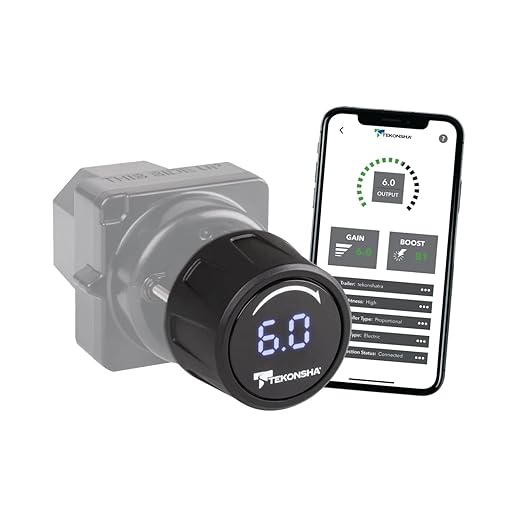
If you want one controller that can grow with you—from occasional utility trailer pulls to a larger travel trailer setup—the Prodigy iD is the “adult” choice. It’s designed to look and feel factory: the power module hides behind the dash, and you interact with a clean rotary knob and a forward-facing LED display. That matters more than aesthetics. It means you’re less likely to mount something awkwardly, less likely to whack it with your knee, and more likely to keep it installed correctly long-term.
The real value is the hybrid control philosophy. Tekonsha gives you a soft-touch rotary knob that handles settings, trailer braking activity and manual override from the driver’s seat, plus the EDGE app on an iOS or Android device to program power output, boost, braking type and more. From either interface you can switch between proportional and timed braking, and between electric and electric-over-hydraulic. That combination is what makes it workable if you tow different trailers or share the truck with another driver.
Expert note: the iD is one of the few smart solutions here that does not trap you into phone-only control in tense moments — the knob is always there. Tekonsha also logs alerts and notifications that can be shared directly with its technical support team, which is a genuinely useful thing to have when something feels off and you would rather not guess.
Why it earns “best overall”
- Clean OEM-style integration – Keeps the cabin tidy and reduces knee-knock and accidental bumps.
- Hybrid control is the sweet spot – App for profiles and fine-tuning, knob for quick real-world adjustments.
- Built for more brakes – If you might tow a larger trailer later, this keeps you from upgrading too soon.
- Diagnostics + alert history – Helpful when something feels “off” and you want to troubleshoot instead of guessing.
Good to know
- The vehicle-specific Tekonsha plug-and-play wiring harness is sold separately — budget for it.
- Tekonsha asks you to verify vehicle compatibility before buying; the supported list covers Ford, GM, Chevy, Dodge, RAM, Toyota and Jeep among others, but it is not universal.
- At $229.99 with only 125 Amazon ratings, this is a premium price on a comparatively thin review base — the CURT Echo below has 3,209.
Ideal for: most towers who want a clean, permanent setup with real capability—especially if you may tow different trailers or upgrade to a heavier rig later.
2. CURT 51180 Echo Mobile – The “No Dash Surgery” Legend for Multi‑Vehicle Towing
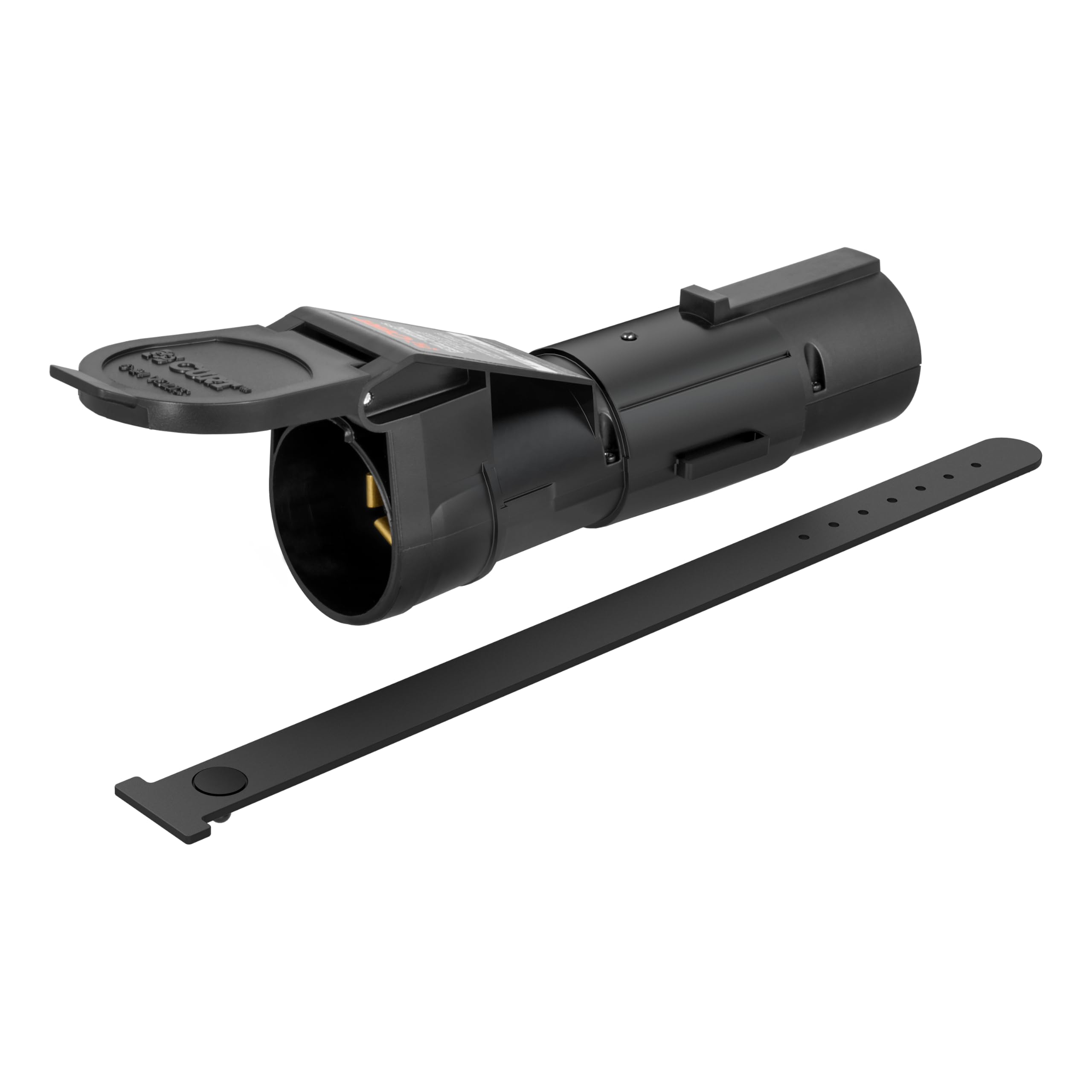
The Echo exists for one core reason: most people don’t want to drill their dash, splice wiring, or give up leg room. If you tow with multiple vehicles (your truck, your spouse’s SUV, a work vehicle, a fleet unit), this is the style of controller that changes your whole life: plug into the 7‑way, connect your phone, pick your profile, and tow.
The engineering detail that matters most is the triple-axis accelerometer: CURT states it maintains proportional trailer braking even if your phone screen locks, a call comes in, or the Bluetooth connection drops entirely. That is the answer to the obvious objection to phone-controlled braking. The Smart Control app stores multiple vehicle-trailer profiles and transfers between compatible setups, and CURT is explicit that adjustments should only be made while the vehicle is stationary.
Here is the nuance most spec sheets skip: a portable 7-way controller is also a connector health test. It hangs off your socket, so a loose or corroded 7-way becomes your problem immediately. CURT addresses this with a locking tab and a retention strap (stored inside the cap) and a potted circuit board for weather resistance, but the unit is 6.63 x 1.63 x 2.88 inches of hardware sitting at the rear of the vehicle — the socket and its geometry are part of the system.
Why it’s so popular
- True plug-and-play install – No wiring harness, no dash drilling, no under‑dash contortions.
- Portable across vehicles – Perfect for families, fleets, rentals, and “I tow with different rigs” life.
- Proportional feel – Stops can feel unified and calm when tuned correctly.
- App-based profiles – Easy to keep different trailer settings without re-learning every trip.
Good to know
- Rated for 1-2 axles and 2-4 electric brakes only — the Tekonsha and Kohree units above handle up to 4 axles.
- Requires 7-way RV blade connections on both the vehicle and the trailer, plus a compatible iOS or Android device.
- CURT specifies that adjustments must be made only when the vehicle is stationary — plan your settings before you set off.
Ideal for: multi‑vehicle owners and “no drilling” shoppers who want a genuinely portable, modern brake controller that can be ready in minutes.
3. REDARC Tow‑Pro Liberty – “Factory Look” Control Without the Dash Box
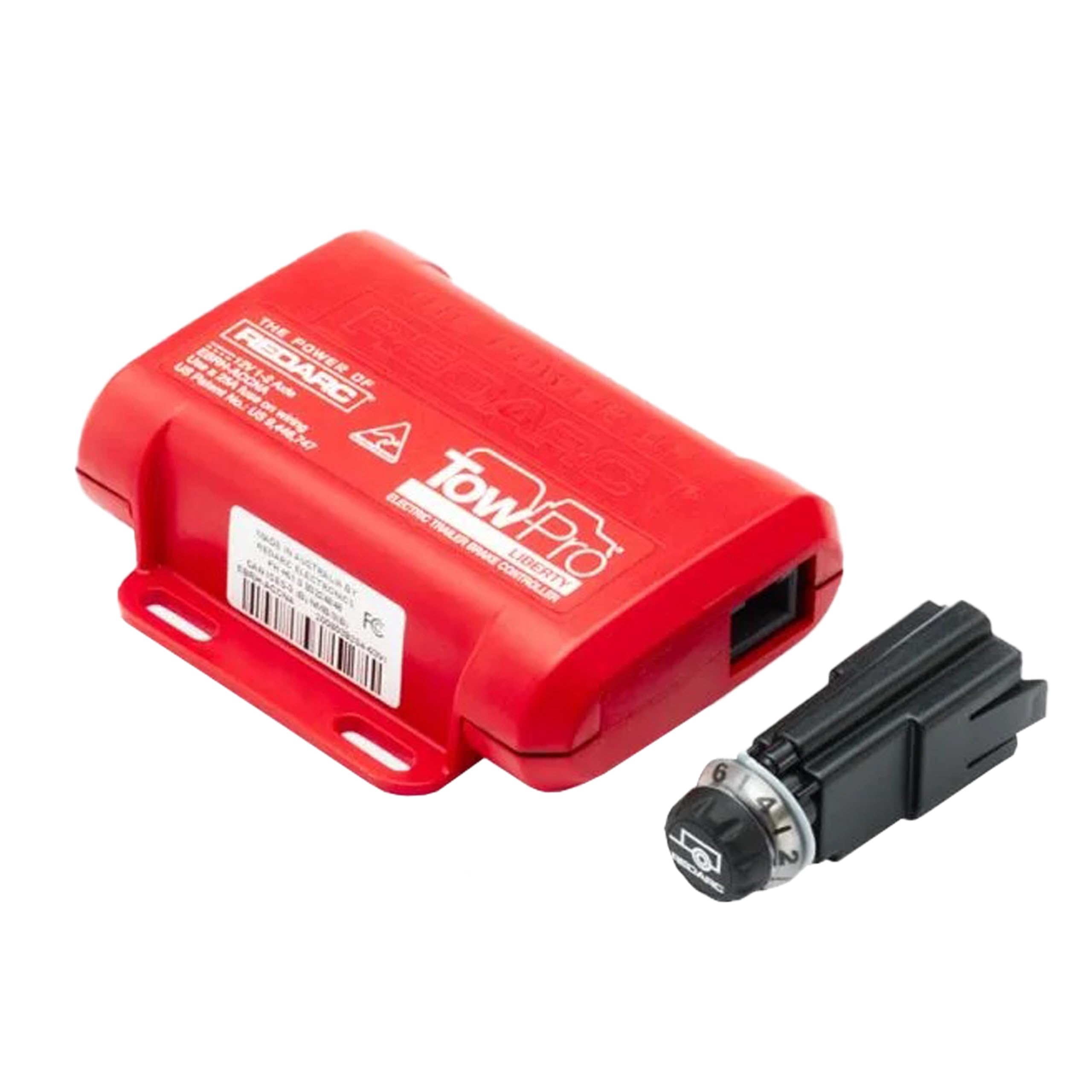
REDARC’s Tow‑Pro Liberty is the controller you buy when you hate clutter. It’s the opposite of the classic big box under the dash: the main unit mounts out of the way, and you get a small dial that looks like it belongs there. The result is genuinely OEM-looking, and it does not steal knee space — which is the whole argument for it in tighter cabins and mid-size trucks. REDARC calls this out directly as a no-knee-knocking design.
REDARC’s own framing is Proportional Mode braking for smooth on-road control that reduces push and pull. Two features do the work behind the dial: Active Calibration, which self-adjusts for orientation, and sway control, which REDARC states operates with or without a trailer attached. The kit includes the controller, a remote head assembly with nut, knob and bezel, and a 3’3″ (1 m) remote head cable.
Where the Liberty can frustrate people is almost always the same place: the knob assembly. If you mount it on a slightly curved surface or in a spot without enough depth clearance, the button press or knob feel can suffer. That’s not a “product is bad” issue—it’s an “install geometry matters” issue. Install it carefully on a flat surface and the experience tends to be excellent.
Why people love it
- Cleanest cabin experience – No big controller box hanging where your knee lives.
- Discreet but functional – Easy daily towing interface that looks OEM when installed well.
- Main unit is flexible – Can fit in many under‑dash layouts because the “brains” can mount almost anywhere.
- Great for small trucks – A common reason people switch from larger traditional units.
Good to know
- Wiring is extra: REDARC’s universal pigtail harness (TPH-025) or a vehicle-specific harness and switch insert are each sold separately.
- Proportional mode only, and rated for 1-2 axles — the Tekonsha, Kohree and P3-style units here go to four.
- Not phone-based, so there are no app profiles or shareable diagnostics. The warranty is 2 years limited.
Ideal for: drivers who want a stealth, factory-looking controller that’s easy to live with daily—especially in vehicles where a traditional box would be in the way.
4. Kohree Upgraded Split‑Design Kit – Windshield Visibility Without Phone Dependence
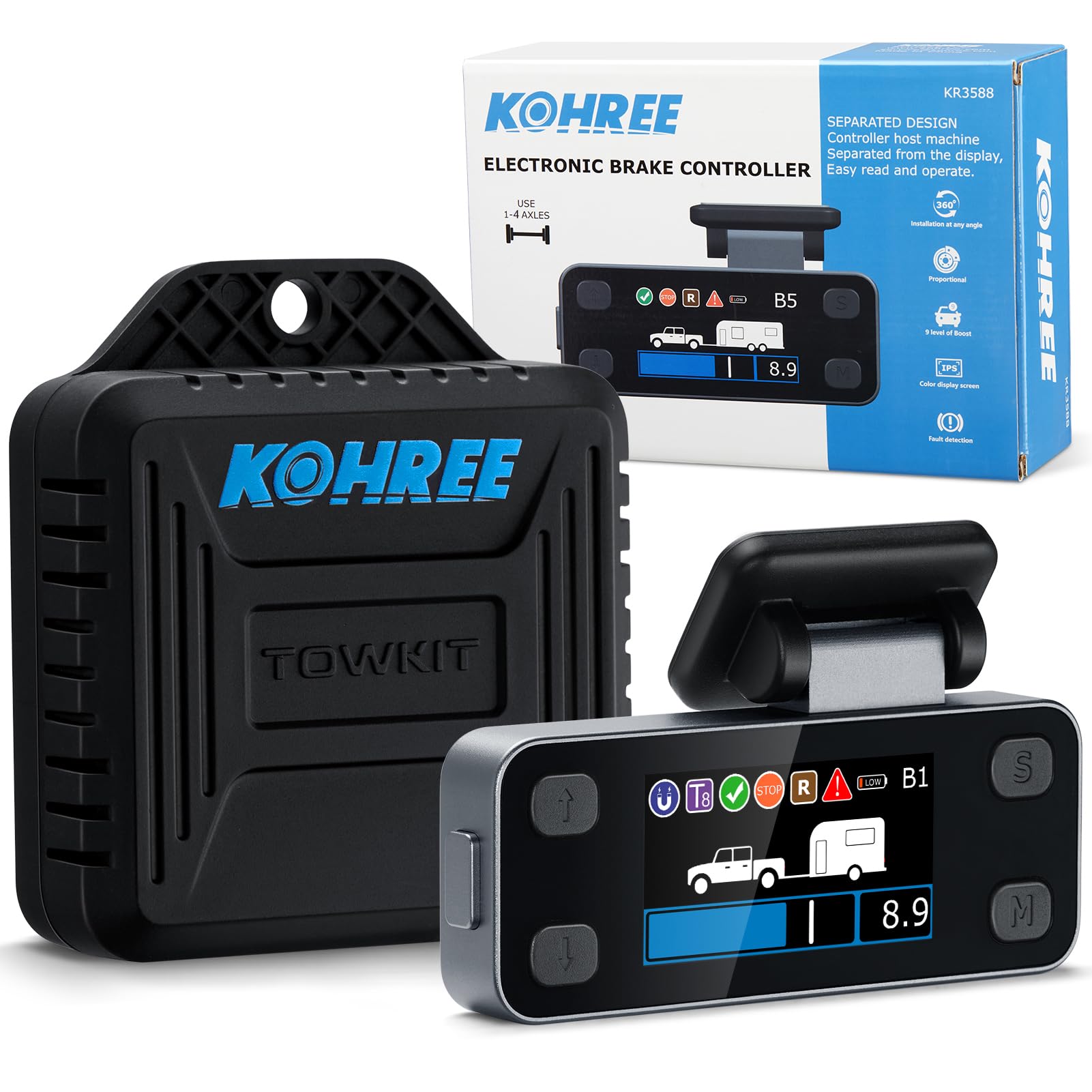
The Kohree split-design concept is genuinely smart: instead of forcing you to read a small screen down near your knees, it gives you a display you can mount where your eyes already go—up high—while the controller itself can live out of the way. For a lot of drivers, this is the best “modern interface” compromise: you get visibility and feedback without trusting your phone to behave perfectly.
Kohree gives it nine boost levels (S1-S9), each step increasing sensor sensitivity so you can match brake response to the weight and braking character of a specific trailer — the finest boost granularity of any controller in this guide. It stores maximum braking force, sensitivity and braking mode for up to eight trailers, supports both proportional and electronic-hydraulic braking, and offers automatic as well as manual levelling. The 1.9″ colour IPS LCD sits in an aluminium alloy housing.
The trade-off is installation. Kohree’s design lets the controller mount at any angle in the rear interior panel with a plug-in wiring harness, while the display goes on the windshield — but that means routing a cable between the two, and how invasive that feels depends entirely on your vehicle’s trim. Four 32-bit processors run the system, two in the display and two in the controller, each independently handling processing and validation.
Why it’s different (in a good way)
- High-visibility display – Windshield placement can reduce “eyes off road” time compared to low-mounted controllers.
- Auto leveling helps real life – Less fiddling with setup rituals; the system is designed to self-adjust for orientation.
- Fine boost control – More steps can mean more “precision feel” when dialing in different trailers.
- Not phone-dependent – Great if you dislike app permissions, updates, or battery saving issues.
Good to know
- Installation means routing a cable from the rear interior panel to the windshield; how clean that is depends on your vehicle.
- 4.6 stars but from only 93 Amazon ratings, with 50+ bought in the past month — a small evidence base.
- If you tow occasionally and want zero wiring, the portable 7-way plug-in units above will feel far simpler. Warranty is 1 year.
Ideal for: drivers who want a clearly visible brake controller display and are willing to do (or pay for) a clean install to get that “premium visibility” payoff.
5. FEITON 90195 “Prodigy P3‑Style” Kit – Familiar Controls, Strong Value, Real-World Quirks
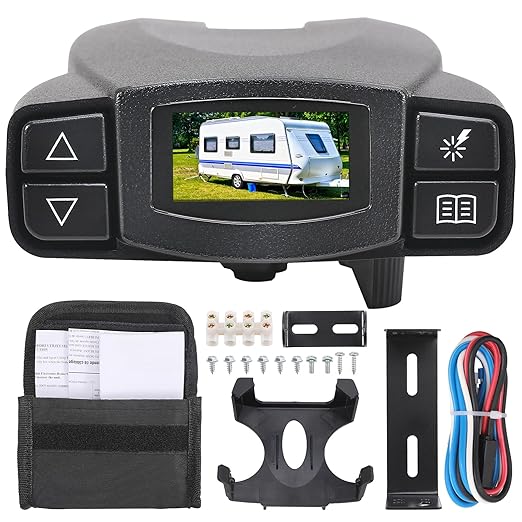
There’s a reason “P3-style” controllers keep showing up in tow vehicles: the interface works. A screen you can read, a manual lever you can grab, boost levels you can set for heavier trailers, and a general workflow that many towers already understand. This kit targets the buyer who wants that classic feel without paying premium pricing.
FEITON delivers the classic feature set at a fraction of the price: three levels of boost pressure, proportional braking with a manual control lever, and an LCD display in English, French or Spanish with adjustable background colour and contrast, showing output current, battery, output voltage, diagnostics and error codes. It stores up to five setting profiles, which covers different trailers or different drivers sharing one truck. Installation uses a plug-and-play harness with both a traditional mounting bracket and a snap-in clip, so the controller can be disconnected and removed quickly.
Buy it if you like the classic style and you are willing to accept aftermarket behaviour in exchange for capability per dollar. FEITON positions it as a replacement for the Curt Tekonsha P3 Prodigy and lists compatibility with Silverado, Ram and Tacoma among others, supporting 1-4 axles across small utility, travel and large commercial trailers. Verify your specific vehicle before ordering.
Why people choose it
- Classic workflow – Screen + manual lever + boost behaves like many familiar controllers.
- Multi-profile memory – Useful if you tow different trailers or share a tow vehicle.
- Strong value for capability – Boost, proportional braking, manual lever and five profiles at $95.99.
- Manual braking is intuitive – Great for controlled slowdowns and fine trailer control.
Good to know
- Three boost levels, against nine on the Kohree kit above.
- 4.2 stars from only 69 Amazon ratings with 50+ bought in the past month — a thin record for a safety-critical part.
- FEITON asks you to verify vehicle fitment before purchase; this is a replacement-style unit, not a universal one.
Ideal for: value shoppers who like a classic in-cab controller interface and want a familiar, boost-capable workflow without relying on a phone app.
6. 90195 “P3‑Style” Controller (Fexhull) – Compact Classic Control for Tight Cabins
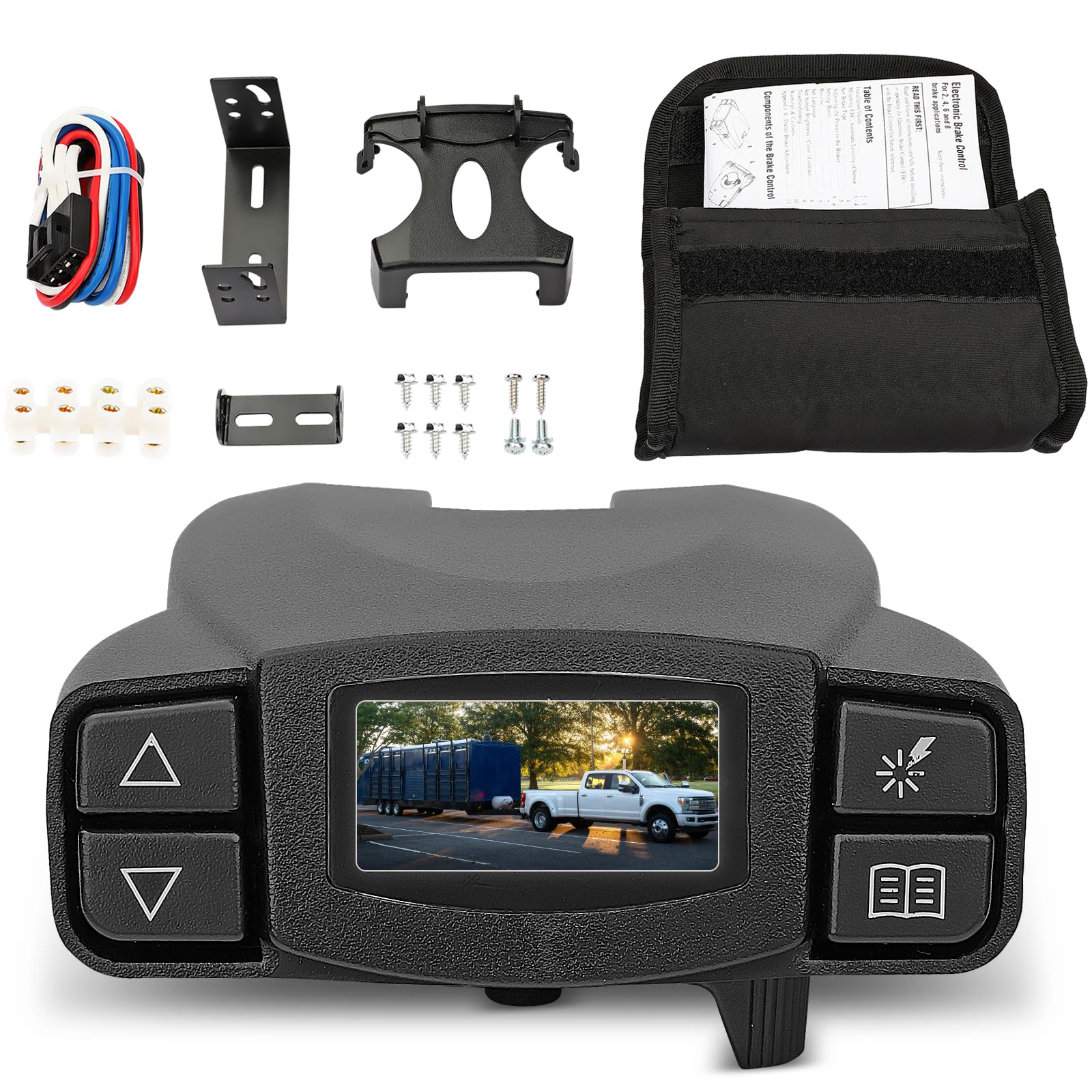
This controller lives in the “classic but practical” zone. If you want an in-cab controller that feels familiar (screen, diagnostics, manual lever) and you’d rather not depend on app behavior, this is the type of product that can make towing feel straightforward.
Fexhull’s answer to the space problem is a compact, dash-hugging design, which is the practical difference between a box you tolerate and one you end up removing between trips. It is worth being honest about the category, though: any under-dash controller competes with your knee for space in a compact truck. If your tow vehicle has limited knee room, weigh this against the REDARC stealth dial above before committing.
Where this style shines is everyday simplicity. The LCD offers multiple screen colour options and shows output current, battery, brake and output voltage at a glance, and a flashing red warning system alerts you to a No Trailer Brake situation. An integrated plug-and-play port takes 2-plug adapters, and the unit handles up to four braking axles. If you have ever borrowed a trailer at short notice, manual control that needs no pairing and no app permissions has obvious value.
Why it’s appealing
- Familiar classic interface – Easy to learn, easy to explain to another driver.
- Manual lever control – Useful for controlled descents and fine trailer behavior adjustments.
- Readable diagnostics – Helps you catch “no trailer” or wiring issues quickly.
- Strong value mindset – $94.99 for a P3-style interface with up to four braking axles.
Good to know
- Fexhull asks you twice on the listing to verify the OE number (90195) and your vehicle model before buying.
- 4.2 stars from only 41 Amazon ratings — one of the thinnest evidence bases in this guide.
- Not a portable device; if you switch tow vehicles often, a 7-way plug-in controller will be far easier.
Ideal for: drivers who want a straightforward in-cab controller workflow and are willing to plan mounting carefully—especially in smaller trucks where knee space is precious.
How Brake Controllers Behave in Real Towing (and Why Setup Beats Hype)
Most towing stress comes from one mismatch: people buy a “smart controller,” then expect it to magically compensate for a loose 7‑way plug, weak trailer grounds, out-of-adjustment brake shoes, or a badly distributed load. A brake controller is not a wizard. It’s a signal generator—and the trailer brakes are the system that turns that signal into stopping power.
What makes a controller feel “premium” on real roads
- Fast, predictable manual control – If you can apply trailer brakes smoothly without drama, you’ll feel calmer in wind and traffic.
- Stable connection behavior – Bluetooth dropouts shouldn’t create braking surprises, and plug-in units should stay seated.
- Adjustments that make sense – Max output, sensitivity, and boost should change feel in a way you can predict.
- Diagnostics you can actually use – Alerts that tell you “what’s wrong” beat guessing in a fuel station parking lot.
- Comfort under pressure – The best systems reduce the number of steps you do while towing (less tapping, less menu diving).
Notice what’s not on that list: “the highest number on the box.” Smooth towing is a combination of good controller logic and a trailer braking system that’s wired correctly and adjusted properly.
The 6-step tuning routine that fixes 80% of “this feels wrong”
- 1) Check the basics – Clean the 7‑way pins, confirm ground integrity, and verify trailer brakes are adjusted.
- 2) Set max output first – Aim for firm stops that don’t lock the trailer tires under normal braking.
- 3) Then adjust sensitivity – Increase until stops feel unified, decrease if the trailer “grabs” early.
- 4) Use boost strategically – Boost is for heavier trailers or certain weight distributions, not for hiding worn brakes.
- 5) Test on a safe, flat road – Do a few controlled stops, then re-check settings after the trailer brakes warm up.
- 6) Save a profile (if you can) – If you tow different trailers, profiles prevent “start from zero” every time.
One more expert tip: many proportional controllers don’t show their “true behavior” when you’re stopped. They need motion to sense deceleration. So do your testing in a quiet lot or low-traffic area where you can actually roll and brake safely.
FAQ: Brake Controllers Without the Confusion
Do wireless brake controllers work if Bluetooth disconnects?
Is a portable 7‑way plug‑in controller “better” than an in-dash unit?
Why do some controllers feel grabby even on low settings?
Do I need manual override if I’m a “casual” tower?
Can I install a box-style controller in a small cabin truck like a Tacoma?
What’s the fastest way to know I set it up correctly?
Final Thoughts: Pick the Controller That Makes Towing Feel Predictable
A great controller doesn’t just “apply brakes.” It reduces uncertainty. It turns towing from “I hope this feels okay” into “this is dialed in.”
Here’s how to translate this guide into a confident purchase:
- Want the cleanest all-around setup with serious capability? Start with the TEKONSHA 90920 Prodigy iD. It’s a smart hybrid: tactile knob control plus app profiles and diagnostics, and it supports more demanding trailer configurations.
- Refuse to drill your dash and tow with multiple vehicles? Choose the CURT 51180 Echo Mobile. It’s the most straightforward path to modern towing without permanent installation.
- Want a factory-looking dial and hate box controllers in your knee space? Pick the REDARC Tow‑Pro Liberty. It’s the stealth comfort pick—just mount the knob carefully on a flat surface.
- Want a visible display without depending on a phone mount? The Kohree split‑design kit is built for readability, especially if you’re willing to do a clean install.
- Prefer classic in-cab controls with boost and profiles (no phone required)? Go with the FEITON 90195 P3‑style kit or the Fexhull 90195 P3‑style controller if you want a familiar screen-and-lever experience.
The best purchase is the one you’ll still trust when you’re tired, towing in traffic, and braking downhill. Choose the best trailer brake controller that matches your real towing life—portable or permanent, phone-based or tactile, occasional trips or weekly hauling—and you’ll stop shopping and start towing with calm confidence.