
Our readers keep the lights on and the garage heater humming. As an Amazon Associate, I earn from qualifying purchases.
Car audio shopping used to be simple: pick a head unit, slap in speakers, call it a day. Now? Your “stereo” is basically the brain of your drive. It decides whether your Android Auto connects instantly or makes you re‑pair on the shoulder. It decides whether your navigation voice is crisp or buried. It decides whether calls sound like you’re in the car… or in a wind tunnel.
If you’re searching for the best android car audio, here’s the non‑fluffy truth: most buying guides focus on the wrong things. They compare screen size like it’s a TV, list watts like it’s a science experiment, and never talk about the daily friction points that actually make owners love or hate a unit after a few weeks.
So this guide is built around real life. I’m looking at what actually matters when you drive every day:
- Connection behavior: how fast it boots, how reliably it re-connects, and whether it stays stable on bumpy roads and long commutes.
- Usability under stress: can you change volume without hunting? Are the touch targets big enough to hit without taking your eyes off the road?
- Audio control where it counts: does it give you meaningful EQ and sub control, or just “bass/treble” vibes?
- Install reality: harnesses, dash kits, steering wheel controls, and how much of this feels “DIY friendly” vs “shop time.”
- Camera workflow: how reverse camera switching behaves, how usable the guidelines are, and whether audio cuts out in annoying ways.
You’ll find two big categories below: in‑dash head units (the clean, permanent upgrade) and portable CarPlay/Android Auto screens (the “keep your factory radio, add a smart screen” move). Both can be a great answer—if you pick the right tool for your exact car and habits.
Let’s get you to a confident, no‑regret buy.
In this article
- How to choose the right Android-friendly setup for your car and driving style.
- Quick comparison table of 16 standout options.
- In‑depth reviews of each model, with practical pros and cons.
- How Android Auto actually behaves in the real world (and how to prevent the common failures).
- FAQ + final buying tips to lock in the right decision.
How to Choose the Best Android Car Audio Setup for Your Car
A smart car stereo isn’t “good” because the listing says it’s powerful. It’s good because it makes your drive calmer: navigation is visible, calls are clean, music feels alive, and everything works without babysitting it. This section is the fast path to choosing correctly the first time.
Best Android Car Audio, explained: what “Android-friendly” should actually mean
Android-friendly doesn’t just mean “it supports Android Auto.” It means the whole system—screen, processor, Bluetooth/Wi‑Fi handshake, USB ports, microphone handling, and audio routing—behaves like it was designed for real driving. A unit can technically support Android Auto and still frustrate you daily if any of these happen:
- Wireless connects, then randomly drops when you hit a pothole or start a call.
- The screen is bright in daylight… but becomes a mirror at the worst times.
- Touch response is fine on day one, but feels “sticky” once the unit warms up.
- Voice prompts are so quiet you crank them up—then your music blasts unexpectedly.
- Reverse camera switching mutes audio in a way that breaks your flow (and never returns properly).
1. Choose your upgrade path: in‑dash head unit vs portable smart screen
This is the biggest fork in the road—and the part most guides rush past.
- In‑dash head unit: cleaner, permanent, usually better audio control and better integration with amps/subs/cameras. Best if you want a “factory-like” cockpit.
- Portable smart screen: no dashboard tear‑down, keeps your factory radio, and can move between vehicles. Best if you want modern navigation and hands‑free features without a full install.
If you’re building a sound system (amp, sub, upgraded speakers), an in‑dash unit is usually the stronger foundation. If you’re mainly chasing navigation + calls + music control (and you’re okay using AUX/FM/Bluetooth to feed your car’s speakers), portable can be a shockingly good “quick win.”
2. Be honest about wireless vs wired Android Auto
Wireless is a lifestyle upgrade—when it’s stable. But wireless demands more from your car environment: clean power, low interference, and a phone that plays nicely with long Wi‑Fi sessions. Wired is less glamorous, but often more predictable.
- Go wireless if you do short trips, frequent starts/stops, and you want the “get in, drive” feel.
- Go wired if you do long commutes, you care about maximum stability, and you don’t mind plugging in (bonus: your phone charges).
If you’ve ever had Bluetooth headphones stutter in a crowded gym—wireless Android Auto can have the same “environment matters” reality. Good units reduce that pain, but the install and your phone still matter.
3. Decide what “good sound” means for you (before you buy)
Here’s the truth that saves you money: “sound quality” is not one thing. Some people mean bass slam. Others mean clarity at low volume. Others mean no harshness at high volume. Your stereo choice should match what you actually care about.
- If you’re adding an amp/sub: prioritize clean pre‑amp outputs and useful sub controls (level + crossover + maybe time alignment).
- If you’re staying stock speakers: prioritize a clean EQ that lets you tame harsh highs and bring vocals forward without distortion.
- If you take calls all day: prioritize microphone handling and noise management over “peak power” claims.
A unit with a thoughtful EQ and stable output often feels “more powerful” than one that just shouts specs.
4. Don’t underestimate the “human controls” (knob vs buttons vs touch)
This is where real owners split hard. Some people love a clean, all‑touch dashboard. Others hate it the first time they drive with gloves, or they need to instantly lower volume because a passenger starts talking.
- Knob lovers: you’ll be happiest with models that keep a physical volume knob (or at least real buttons).
- Touch-first drivers: focus on screen responsiveness, big icons, and a UI that doesn’t bury basic actions.
Also: pay attention to screen angle and glare. A slightly smaller screen that’s perfectly angled can be safer and easier than a bigger screen that reflects the sky.
5. Plan the install like a pro (even if you’re DIY)
Most frustration happens before the first boot. Not because the stereo is “bad,” but because the install wasn’t planned. For many cars, you’ll want to expect these extras (varies by vehicle):
- Wiring harness adapter (so you don’t cut factory wires).
- Dash kit / trim bezel (for a clean fit).
- Antenna adapter (very common).
- Steering wheel control interface (if your car needs one).
- Camera retention or conversion module (if you have a factory camera you want to keep).
If you’re going portable, your “install plan” is simpler—but still matters: mount position, cable routing, and how you’ll feed audio to your speakers (AUX is usually cleaner than FM if your car supports it).
6. Avoid the two traps that create buyer’s remorse
Two mistakes account for most buyer’s remorse in this category:
- Trap #1: Buying for features you won’t use. Dash cam input, mirror link, video playback—cool, but only valuable if you will truly set it up and keep it running.
- Trap #2: Buying too cheap for your expectations. If you want “OEM smooth,” ultra-budget units can feel like a compromise. If you want “functional and modern,” many value units are fantastic.
The win is matching your expectations to the right tier—and reading what each listing actually promises before you commit.
Quick Comparison: 16 Best Android Car Audio Picks
Use this table to find the models that match your setup—then jump to the full reviews for the “real life” details: what each unit’s listing specifies, what the install involves, and which caveats the manufacturers themselves publish.
On smaller screens, swipe or scroll sideways to see the full table.
| Model | Form factor | Android strength | Best match | Amazon |
|---|---|---|---|---|
| PLZ 10.1″ Wireless Single DIN (Floating) | Single DIN floating | Big screen + wireless Android Auto + DSP/EQ control for daily comfort | Most drivers who want a “modern cockpit” without premium pricing | Amazon |
| Alpine iLX‑W670 | Double DIN | Wired Android Auto with serious sound tuning tools (EQ/time correction/crossovers) | Drivers who care more about sound control than “wireless convenience” | Amazon |
| KENWOOD DMX4710S | Single DIN | Wired Android Auto plus 13-band EQ, digital time alignment and Maestro support | Drivers who want a legacy-brand receiver that genuinely runs Android Auto | Amazon |
| ATOTO A5L 7″ Android Double DIN | Double DIN | Android OS with Play Store apps plus wired/wireless Android Auto | Drivers who want the head unit itself to run apps, not just mirror a phone | Amazon |
| BOSS BV9358B | Double DIN | Android Auto + CarPlay with front and rear camera inputs and full pre-amp outputs | DIY installers who want the most widely-reviewed unit here | Amazon |
| Soundstream VRCPAA‑7DRM 7″ | Double DIN | Front + rear camera inputs with 12V trigger, 10-band EQ, 4V pre-outs | Drivers running more than one camera who still want amp-ready outputs | Amazon |
| Jensen J1CA7‑BUC 7″ | Double DIN | Certified Android Auto, camera and mic included, 4-year warranty on registration | Buyers who want everything in one box and long warranty cover | Amazon |
| SJoyBring 7″ QLED Double DIN | Double DIN | Sharp QLED screen + fast wireless Android Auto feel | Drivers who want crisp visuals and a simple UI on a budget | Amazon |
| JVC KW‑M560BT | Double DIN | 13-band EQ with digital time alignment and full subwoofer control | Drivers who want plain, solid hardware with proper sound staging | Amazon |
| Pioneer DMH‑1770NEX 6.8″ | Double DIN | Mainstream-brand Android Auto, compact chassis, harness and remote included | DIY installers who want a familiar brand and a straightforward fit | Amazon |
| GBEER 6.5″ Single DIN InCell (CarPlay/Android Auto) | Single DIN | Wireless Android Auto + 38W USB‑C charging | Basic modernization for older vehicles and work rigs | Amazon |
| TECXERLLON 10.26″ Portable Screen (4K Cam) | Portable screen | Large display + Android Auto + dual-camera dash cam workflow | Drivers who want “modern screen” without a dash teardown | Amazon |
| IIWEY iK7 10″ Portable Screen (4K Cam) | Portable screen | Polished portable workflow + strong camera bundle concept | Older cars that need a smart screen + dash cam in one | Amazon |
| HAUXIY 9″ Portable Screen (4K Cam) | Portable screen | Android Auto + dash cam + parking monitor style features | Drivers who want recording + navigation without a stereo install | Amazon |
| Krunia 9.26″ Portable Screen (OTA) | Portable screen | OTA updates + bright IPS panel + consistent daily connection feel | “Set it and forget it” portable shoppers who want long-term polish | Amazon |
| PASLDA 7″ Portable Screen | Portable screen | Wireless and wired Android Auto on a plug-in 7″ screen, with Bluetooth/AUX/FM audio routing | Budget shoppers upgrading an older car without touching the dashboard | Amazon |
In‑Depth Reviews: 16 Android‑Friendly Car Audio Upgrades That People Actually Enjoy Using
Now we go model by model. I’m going to talk like a driver (and installer), not a spec sheet: what each listing actually specifies, what the manufacturer’s own caveats are, and what you should set up correctly the first time.
1. PLZ 10.1″ Wireless Single DIN Floating – Big-Screen Comfort Without the Premium Ego
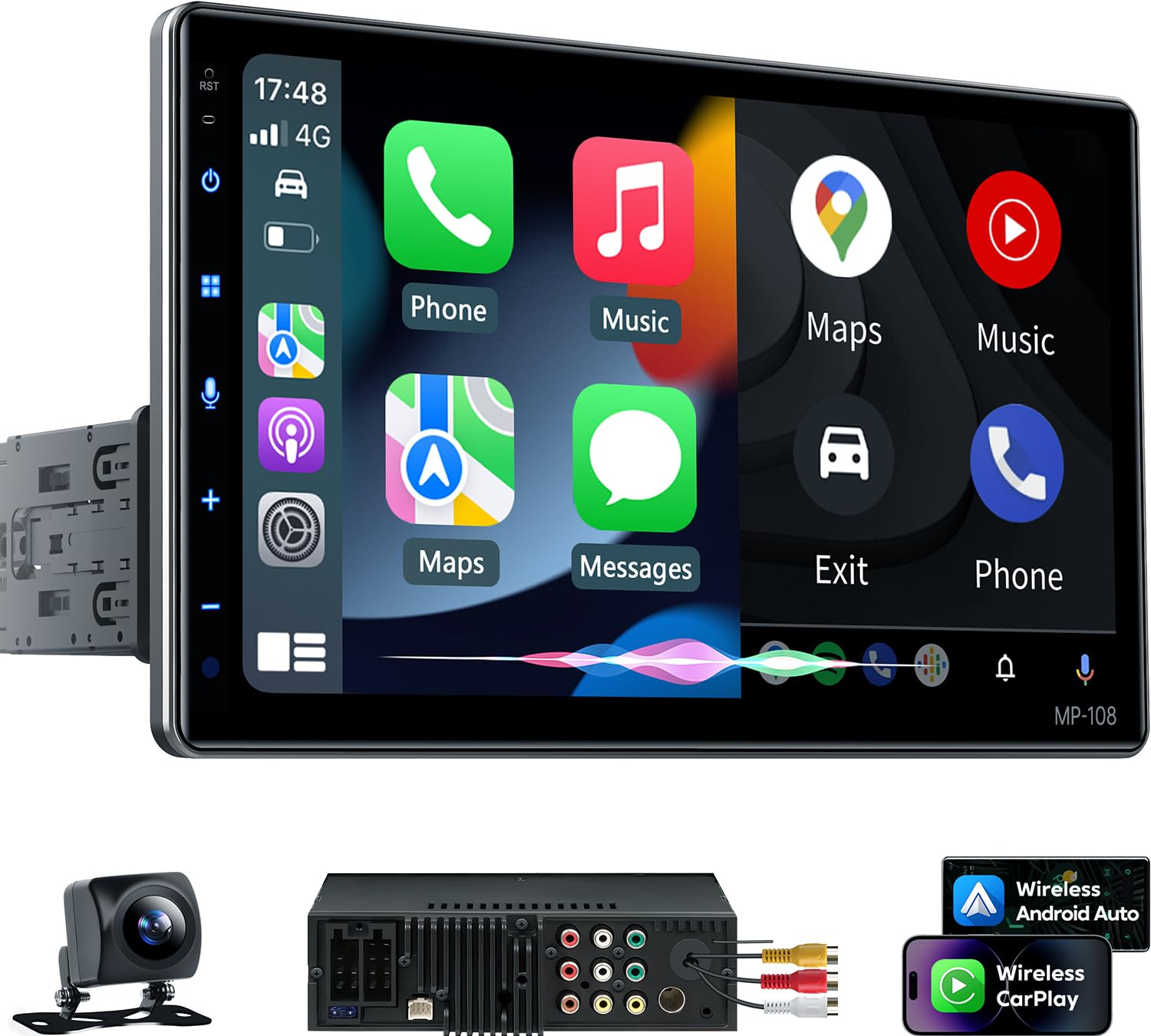
If you want one upgrade that makes an older car feel instantly modern—without going full “luxury brand tax”—this PLZ floating unit is a strong anchor pick. The reason is simple: it nails the daily experience that most drivers care about more than anything else—visibility, speed, and usable control. A big, adjustable screen changes your whole relationship with navigation. You stop squinting. You stop balancing your phone on a vent mount. You glance, you understand, you keep driving.
Where this model earns the “best overall” slot is the way it blends screen comfort with audio control that’s actually meaningful. The built-in DSP and 10‑band EQ matter because they let you fix the common “factory speaker problem”: harsh highs, thin vocals, and bass that disappears as road noise rises. You don’t need to be an audio nerd—just moving the sound toward “clear and full” makes your commute feel less tiring.
The rest of the spec sheet backs that up. The panel is a 10.1-inch IPS running 1280 x 720 with multi-angle adjustment, and PLZ lists it as fitting most single and double DIN dash openings. CarPlay and Android Auto run wired or wireless, Bluetooth comes from an independent 5.3 module with its own antenna to cut interference, and the audio side is a 4.2-channel pre-amp rated 60W x 4 with two subwoofer outputs. A rear camera and steering wheel control support are included, along with a 3A fast-charging port. It averages 4.1 stars across roughly 793 Amazon ratings, with a one-year warranty.
Why you’ll like it
- Big, adjustable screen = safer navigation – The viewing angle flexibility is a real quality-of-life upgrade.
- Audio control that actually helps – DSP + multi-band EQ lets you tune for your car’s acoustics instead of “hoping it sounds good.”
- Strong daily usability – Wireless Android Auto convenience plus a UI that isn’t trying to be complicated.
- Feels more premium than the category – Metal framing and a stable “mounted” feel matter when your car hits bumps.
Good to know
- Floating screens are amazing, but they can block vents or buttons in some dashboards—plan your angle and depth before final mounting.
- Wireless projection is only as good as your power stability; clean grounding and tidy wiring reduce “random weirdness.”
- PLZ tells you to confirm your dash opening size first — a separate dash kit may be needed, and it recommends professional installation.
Ideal for: most drivers who want a big, readable screen, wireless Android Auto convenience, and enough sound control to make daily driving feel noticeably better.
2. Alpine iLX‑W670 – The “Control the Sound, Don’t Just Hear It” Upgrade

Let’s talk about what separates “a screen that shows Android Auto” from “a real audio upgrade.” If you’ve ever upgraded speakers and still thought, “Why does this feel… off?”—you’ve met the problem Alpine solves: your car is an ugly listening room. The driver is closer to one speaker. Glass reflects highs. Doors rattle. Bass gets eaten by road noise. A unit like the iLX‑W670 gives you the tools to correct those realities instead of pretending they don’t exist.
The standout here is tuning depth: a 13‑band EQ, multi-channel time correction, and crossovers for front/rear/sub. Those are not “nice to have” if you’re picky. They’re the difference between a system that’s loud and a system that’s balanced. Even with factory speakers, dialing vocals forward and smoothing harsh frequencies can make podcasts and calls feel dramatically clearer. With an amp/sub setup, the control becomes even more satisfying—you can integrate bass instead of just “adding boom.”
The big trade: Android Auto is wired. For some people, that’s a deal-breaker. For others, it’s a relief—wired connections can be calmer and more predictable, especially if your phone is the kind that sometimes gets weird about wireless sessions. If you want “maximum stability and maximum control,” this is the mood.
Why sound lovers choose it
- Real tuning tools – EQ, time correction, and crossovers let you shape the sound instead of accepting whatever your doors give you.
- Wired Android Auto stability – Less dependent on wireless handshake conditions and interference.
- Shallow chassis flexibility – Helpful for tighter dashboards and cleaner cable management.
- “Grows with your system” – Works great stock, gets even better when you add amps, subs, or better speakers.
Good to know
- Wired Android Auto means you’ll want a good cable and a clean routing plan (the best setups make the cable feel invisible).
- Advanced tuning is powerful—but it can be overwhelming if you don’t enjoy tweaking. You can still keep it simple, but the temptation is real.
- Call quality can hinge on microphone placement; treat the mic like a “real component,” not an afterthought.
Ideal for: drivers who care about audio quality and control, want a stable Android Auto experience, and like the idea of tuning their system into something that feels intentionally “yours.”
3. KENWOOD DMX4710S – The Brand-Name Receiver That Actually Runs Android Auto

This is the pick for the driver who wants Android Auto but does not want to gamble on an unfamiliar brand. The DMX4710S is a KENWOOD digital multimedia receiver that integrates Apple CarPlay and Android Auto with a voice-controlled interface, so the maps, messages and music you already use on your phone show up on the dash instead of in a vent mount. It is a single DIN chassis with a 6.8" capacitive LCD touch panel running 1024 x 600 WSVGA, which is a genuinely readable screen at a glance.
What separates it from the cheap end of this list is the tuning gear. KENWOOD gives you a 13-band graphic EQ and built-in digital time alignment – the two tools that let you pull a factory speaker set back toward clear vocals and even bass instead of just louder mush. Playback covers MP3, WMA, AAC, WAV and FLAC, and there are front, rear and subwoofer pre-outs, so this can stay in the car later when you add an amp.
Integration is the other reason to pay up here. It is compatible with the Maestro RR and RR2 for deeper vehicle integration, supports iData modules for most OEM steering wheel controls and factory amplifiers, ships with a GPS antenna, and is SiriusXM satellite-radio ready. If you would rather cast the phone itself, the Mirroring OA for KENWOOD app mirrors an Android 7.0+ phone over USB and Bluetooth with two-way touch control. On Amazon it holds a 4.4-star rating across 64 ratings.
Why it works
- Real Android Auto – CarPlay and Android Auto are built in, not a mirroring workaround.
- Serious tuning – 13-band graphic EQ plus digital time alignment, which most budget units skip.
- Fits into a real system – Front, rear and subwoofer pre-outs, 50W x 6-channel output.
- Factory integration – Maestro RR/RR2 and iData support for steering controls and factory amps.
Good to know
- CarPlay and Android Auto are wired here – you plug the phone in, you do not just walk up to the car.
- At $299 it is one of the pricier picks on this list, and it does not include a backup camera.
- The review base is still small (64 ratings) compared with the volume sellers further down.
- Chassis depth is listed at 9.6", so measure behind the dash before you commit.
Ideal for: drivers who want Android Auto from a long-established car audio brand, with proper EQ and time alignment, and who do not mind plugging the phone in.
4. ATOTO A5L 7″ Android Double DIN – Wireless Android Auto Plus a Head Unit That Runs Its Own Apps

Most units in this guide are projection receivers: your phone does the thinking, the stereo is the screen. The A5L is a different animal. ATOTO builds it on Android with 2GB of RAM and 32GB of storage, so the head unit can install and run its own software — and it still does wired and wireless Android Auto on top. If you have ever wanted a navigation or music app that Android Auto refuses to show, that is the gap this fills.
ATOTO gives it three separate ways onto the internet — Wi‑Fi hotspot, Bluetooth tethering, or USB tethering while your phone charges — plus access to the Google Play Store, with a preinstalled “FindApps” tool for anything not carried there. Over‑the‑air upgrades are part of the design rather than an afterthought. Phone projection itself runs through ATOTO’s ZLink: pair once over Bluetooth and Wi‑Fi and it reconnects automatically after that.
The hardware backs it up. The panel is a 7‑inch 1280 x 720 QLED touchscreen. The built‑in amplifier is rated at a maximum 4 x 45W (4 x 24W RMS), routed through a 24‑band EQ with nine presets and DSP. The included AC‑HD01LR camera is a 720P AHD unit with a 140‑degree view and night vision, and ATOTO’s Real‑Time Rear View lets you call the feed up at any time rather than only in reverse — useful with a trailer or bikes on the back. Bluetooth handles multiple devices at once, so an OBD‑II dongle or TPMS sensor can sit in the background while music and calls keep running, and the listing adds a Bluetooth auto‑lock behaviour. OEM steering wheel controls are retained. Product care is 12 months from purchase, with a further 6 months available on request. It averages 4.2 stars across roughly 246 Amazon ratings.
Why you’ll like it
- It is a computer, not just a screen – Android OS with Play Store access covers apps Android Auto will not show.
- Real tuning depth – 24‑band EQ with nine presets and DSP, not a bass/treble slider.
- Camera included and always available – 720P AHD, 140° view, callable outside reverse.
- Three ways to stay online — Wi‑Fi hotspot, Bluetooth tethering, or USB tethering.
Good to know
- ATOTO notes that wireless CarPlay/Android Auto occupies the Wi‑Fi radio, so keeping Android apps online at the same time needs Bluetooth or USB tethering.
- Phone mirroring is described as an edge‑case feature — use it parked or with a passenger, and only where legal.
- An Android head unit is more to set up than a plain projection receiver; budget an evening for it.
Ideal for: drivers who want wireless Android Auto but also want the head unit itself to run apps, take a camera feed on demand, and give them serious EQ control.
5. BOSS BV9358B – Popular, Feature-Stacked, and Surprisingly Capable When Set Up Right

The BV9358B has the largest feedback base in this guide — roughly 5,515 Amazon ratings at a 4.1-star average, comfortably ahead of anything else here. For a DIY installer that volume is itself useful: whatever question comes up mid-install, someone has almost certainly hit it first.
BOSS gives the hard numbers: 5.35″ x 7.40″ x 4.57″ and 2.32 lbs, an 800 x 480 widescreen panel, 80 watts across four channels, an NTSC/PAL and USA/Europe tuner with 30 preset stations and ID3-TAG support. Inputs cover USB, audio/video, front and rear cameras and an external microphone; outputs are front, rear and subwoofer pre-amps, which is what lets the unit stay in the car when you add an amp or a sub later.
Where you need to be careful is the listing itself, which contradicts its own headline. The title reads as a 7-inch double DIN with no CD or DVD player, while BOSS’s own product description on the same page describes a 6.2-inch DVD player with CD, SD and USB slots. Buy on the features you actually need — Android Auto, Bluetooth, camera input — and confirm the disc and media details with the seller before you click purchase.
Why it still gets picked
- Largest feedback base here – around 5,515 Amazon ratings, more than any other unit in this guide.
- 80 watts x 4 channels with front, rear and subwoofer pre-amp outputs.
- Good audio routing options – Helpful for sub integration and better balance.
- Three-year platinum online dealer warranty when bought through Amazon.
Good to know
- 800 x 480 screen resolution — modest beside the 1280 x 720 panels elsewhere in this guide.
- Steering wheel control needs a separate interface module (BOSS recommends the Metra ASWC-1).
- The listing contradicts itself on screen size and disc playback — confirm the variant before ordering.
Ideal for: DIY installers who want a widely-discussed double din with Android Auto support and enough audio routing features to build a satisfying daily system.
6. Soundstream VRCPAA‑7DRM 7″ Double DIN – Two Camera Inputs and Tuning That Actually Goes Somewhere
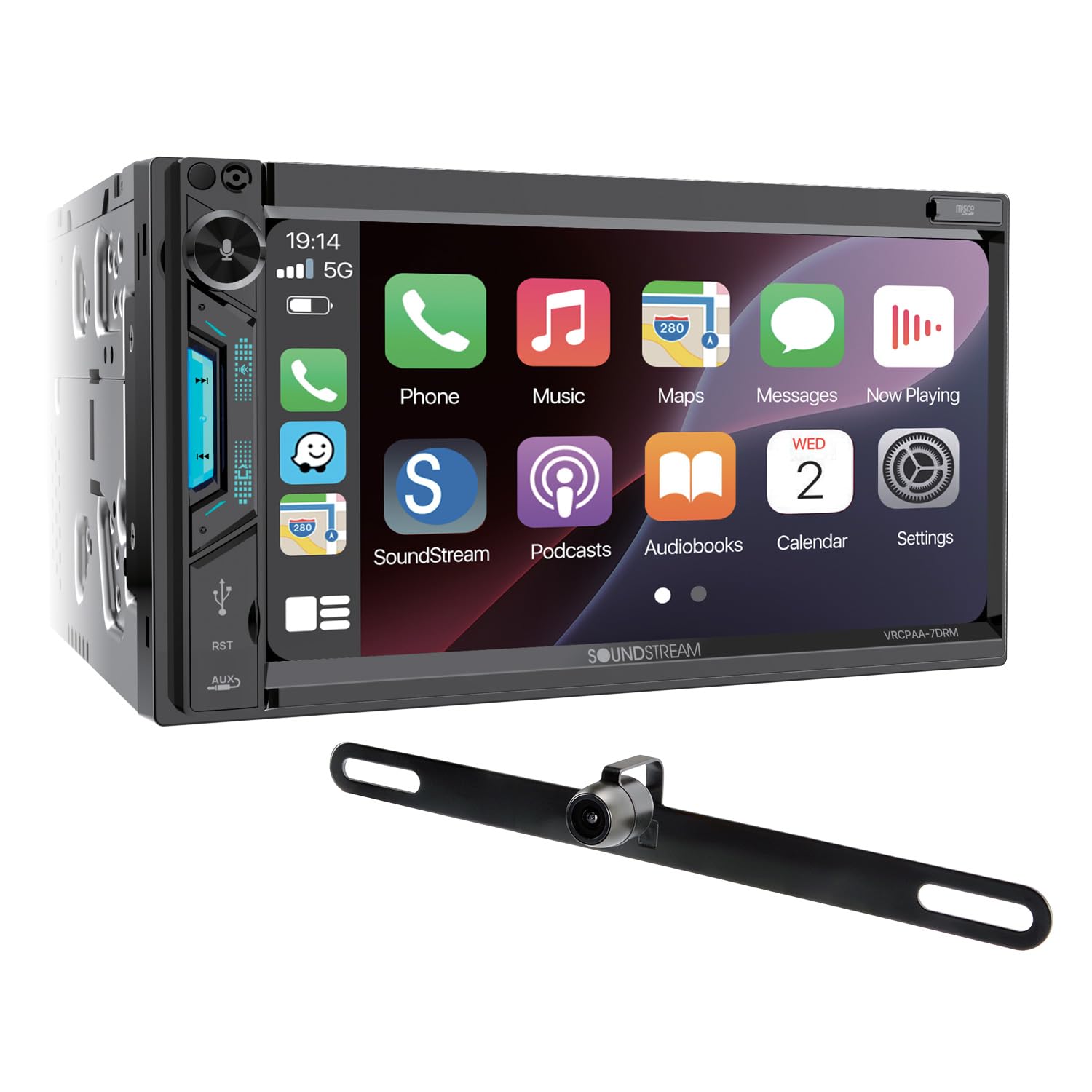
This is the unit to look at if your safety plan involves more than one camera — and specifically if you want the switching handled for you. Soundstream supports both front and rear camera RCA inputs with a 12V trigger for automatic switching, which is the difference between a camera you have to select and a camera that simply appears when the car needs it to. That matters on a long hood, in a tight garage, or anywhere you park by feel.
Phone projection is built in: Apple CarPlay with Siri and Android Auto with Google Assistant, running on a 7‑inch high‑resolution TFT‑LCD with a capacitive touchscreen, which is the responsive kind rather than the press‑harder kind. Soundstream adds 7‑colour selectable illumination so the face can be matched to the rest of your interior lighting instead of fighting it.
The audio section is more serious than the price suggests. You get a 10‑band digital EQ with user presets, front, rear and subwoofer 4V RCA pre‑outs, and 300W across four channels of speaker output. The 4V pre‑outs are the detail worth noting — they give an outboard amplifier a stronger, cleaner signal to work with than the 2V outputs common at this tier. The design is mechless, meaning no CD or DVD mechanism to fail, with Bluetooth calling and audio, call logs and contact access, and playback from front USB or microSD up to 64GB with ID3 tag display. It averages 4.1 stars across roughly 268 Amazon ratings.
Why it’s a strong daily driver
- Front and rear camera inputs – With a 12V trigger for automatic switching, not manual hunting.
- 4V pre-outs on all three channels – A stronger signal to feed an amp or sub later.
- 10-band digital EQ with presets – Real tone shaping for a stock speaker set.
- Mechless design — no disc mechanism to jam or wear out.
Good to know
- The listing contradicts itself on the camera: the feature list and title say a backup camera is included, while the product description says cameras are sold separately. Confirm with the seller before ordering.
- The power figures on the page disagree too — 300 watts in one field, 240 in another.
- microSD playback tops out at 64GB, so a very large offline library will not fit.
Ideal for: drivers building a camera setup front and back, who also want pre-outs strong enough to add an amplifier without regretting the head unit.
7. Jensen J1CA7‑BUC 7″ Double DIN – Certified Android Auto With the Camera and Mic Already in the Box

“Certified” is doing real work in this listing. Jensen states an ongoing collaboration with Apple and Google that certifies compatibility with their current operating systems — which is the quiet difference between a unit that keeps working after your phone updates itself overnight and one that suddenly does not. If you have been burned by a projection unit that broke after an OS update, that is the line to read twice.
The rest is refreshingly complete. The screen is a 7‑inch LED panel at 1024 x 600. Bluetooth covers hands‑free calling with phonebook support and wireless music streaming, and Jensen lists the receiver as compatible with the vast majority of Bluetooth devices. Voice control runs through Siri or Google Assistant for directions, texts and calls, with a push‑to‑talk button so you are not shouting a wake word at your dashboard.
What arrives in the box is the reason this earns a slot: the BUCAM100J backup camera, an external microphone, the stereo and a power harness are all listed as included components — three of the four things that usually turn into a second order after the head unit lands. Warranty is the other half of the pitch: a standard two‑year term that extends to a full four years when you register the product. It averages 4.0 stars across roughly 103 Amazon ratings, with output rated at 240 watts.
Why it stands out
- Certified against current Apple and Google OS releases – Fewer nasty surprises after a phone update.
- Camera, external mic and harness included – Fewer follow-up purchases before you can finish the install.
- Four-year warranty on registration – Two years standard, doubled when you register.
- Push-to-talk button for Siri or Google Assistant.
Good to know
- 1024 x 600 is a sensible resolution but not the sharpest panel in this guide.
- The four-year cover only applies if you actually register — do it the day it arrives.
- Around 103 ratings is one of the smaller samples here, so there is less collective install experience to lean on.
Ideal for: drivers who want certified, update-proof Android Auto, everything needed in one box, and a warranty that outlasts the first year.
8. SJoyBring 7″ QLED Double DIN – The “Looks Expensive” Screen Without the Expensive Commitment

If your number one priority is “I want my dash to look modern and sharp,” this QLED screen model is a strong contender. A good display changes everything: maps are clearer, album art looks clean, and the whole interface feels more premium—even if the unit is firmly in the value tier. The panel is a 7-inch QLED at 1280 x 720 that will play 1080p video, and SJoyBring pairs it with a physical twist volume knob rather than a touch-only control.
Where it fits best is the “daily modernizer” role: it brings wireless phone projection, basic EQ tools, and sub outputs that let you build a better sound system over time. It’s not trying to be an audiophile masterpiece, but it gives you enough control to get a satisfying sound from upgraded speakers, especially if you take a few minutes to tune it.
Two practical caveats come straight from SJoyBring. Steering wheel control needs an extra interface bought separately — the company recommends the PAC SWI-CP2 or the Metra ASWC. And the chassis is standard 6.69″ x 3.81″, so check your dash opening; some cars need a dash kit and two extra adapters on top. Bluetooth runs from an independent 5.3 module with its own antenna, and the chassis uses a porous heat sink. It averages 4.3 stars across roughly 880 Amazon ratings.
Why it’s a crowd-pleaser
- QLED clarity – Makes navigation and daily UI use feel more premium.
- Fast “modern feel” – Wireless Android Auto can feel quick and easy when your setup is clean.
- System-friendly outputs – Dual sub outs and multi-channel layout work well for future upgrades.
- Physical twist volume knob – eyes-on-road control instead of hunting a touchscreen.
Good to know
- Steering wheel control needs an extra interface — SJoyBring recommends the PAC SWI-CP2 or Metra ASWC.
- Standard 6.69″ x 3.81″ opening required; some cars need a dash kit plus two extra adapters.
- If you want maximum loudness and headroom, higher-end brands still win—but cost more.
Ideal for: drivers who want a crisp, modern-looking screen and wireless Android Auto without spending like they’re building a show car.
9. JVC KW‑M560BT Double DIN – A Plain, Well-Sorted Receiver With Serious EQ Underneath

Some head units want to be the most interesting thing in your car. This one does not, and that is the appeal. JVC sells the KW‑M560BT as a digital receiver with an AM/FM tuner and a capacitive touchscreen that fits standard double‑DIN openings — no disc mechanism, no operating system to babysit, no feature list you will spend a weekend disabling. It boots, it projects your phone, it plays.
Underneath the plain exterior is the tuning suite that makes this worth the money. You get a 13‑band equaliser with digital time alignment and separate subwoofer level, phase and low‑pass crossover controls. Time alignment is the one people underestimate: it lets you delay the near speakers so the stereo image lands in front of you rather than against the driver’s door, and it is not something every receiver at this size offers. Output goes to six preamp channels — 2‑volt front, rear and subwoofer — with a built‑in amp rated at 21 watts RMS (45 peak) per channel across four channels.
On the practical side, Bluetooth handles hands‑free calling and audio streaming with dual phone connection, so two phones can stay paired. USB Mirroring is available for Android phones, and the USB port charges at up to 1.5A. Connections cover a rear USB input, a rear mini A/V input and a backup camera input, with an RCA rear video output; it is SiriusXM ready. Factory steering wheel controls work with most vehicles through an adapter. It averages 4.2 stars across roughly 408 Amazon ratings.
Why it’s easy to live with
- 13-band EQ with digital time alignment – Proper staging control, not just tone knobs.
- Full sub control – Level, phase and low-pass crossover for clean integration.
- Dual phone Bluetooth – Work phone and personal phone paired at once.
- Six-channel 2V preamp outputs for front, rear and subwoofer.
Good to know
- It does not play CDs — JVC states this outright.
- The listing quotes the screen as 6.8″ in the title and 6.75″ in the feature list; treat it as a 6.8-inch class panel either way.
- The parking brake wire must be connected and set to reach settings and video display — plan that into the install.
- Steering wheel control needs a vehicle-specific adapter, sold separately.
Ideal for: drivers who want a straightforward, well-built double din with Android Auto and enough tuning depth to make stock speakers sound properly staged.
10. Pioneer DMH‑1770NEX 6.8″ Double DIN – The Mainstream-Brand Receiver Built for a Straightforward DIY Install

If you are doing this yourself in a driveway on a Saturday, brand familiarity is worth something real. Pioneer has been making in‑dash receivers longer than most of the names in this guide, and this model has built up a substantial feedback base — roughly 683 Amazon ratings at a 4.2-star average. That volume is practical, not just reassuring: whatever your car does during the install, someone has probably hit it first and written it down.
The feature set is deliberately mainstream. Apple CarPlay and Android Auto give you Maps, Music, Messages, Phone, Podcasts and Siri voice commands on a 6.8‑inch capacitive touchscreen. Bluetooth handles hands‑free calling and wireless audio streaming with control from the device. The unit is rear‑view camera capable, so the camera is a decision you can make later rather than one bundled into the price.
Two things make it install-friendly. The chassis is a compact 7 x 3‑7/8 x 4‑7/8 inches, which matters when the space behind a dash opening is full of ductwork. And the box includes a wiring harness, an audio/video output harness and a wireless remote control (CXE5116) — the remote being genuinely useful if the screen ends up low or far right in a wide dash. Pioneer also supports Amazon Alexa through its Vozsis and Weblink smartphone apps, and the unit is SiriusXM ready. Output is rated at 200 watts across four channels, with a one-year warranty.
Why it still gets picked
- Substantial feedback base — around 683 Amazon ratings at a 4.2-star average.
- Compact chassis – 7 x 3-7/8 x 4-7/8 inches fits awkward dash cavities.
- Harnesses and a remote in the box – Fewer surprises mid-install.
- Alexa support through Pioneer’s Vozsis and Weblink apps.
Good to know
- No camera is included — the unit is camera capable, and the camera is a separate purchase.
- Pioneer’s own power figures disagree on the page: 200 watts in one field, 14 in another.
- Warranty is one year — the cheaper Jensen and BOSS units in this guide both carry multi-year cover.
Ideal for: DIY installers who want a mainstream-brand double din with Android Auto, a compact chassis, and enough shared install knowledge to get unstuck fast.
11. GBEER 6.5″ Single DIN InCell CarPlay/Android Auto – The Minimal Spend, Maximum Modern Feel Move
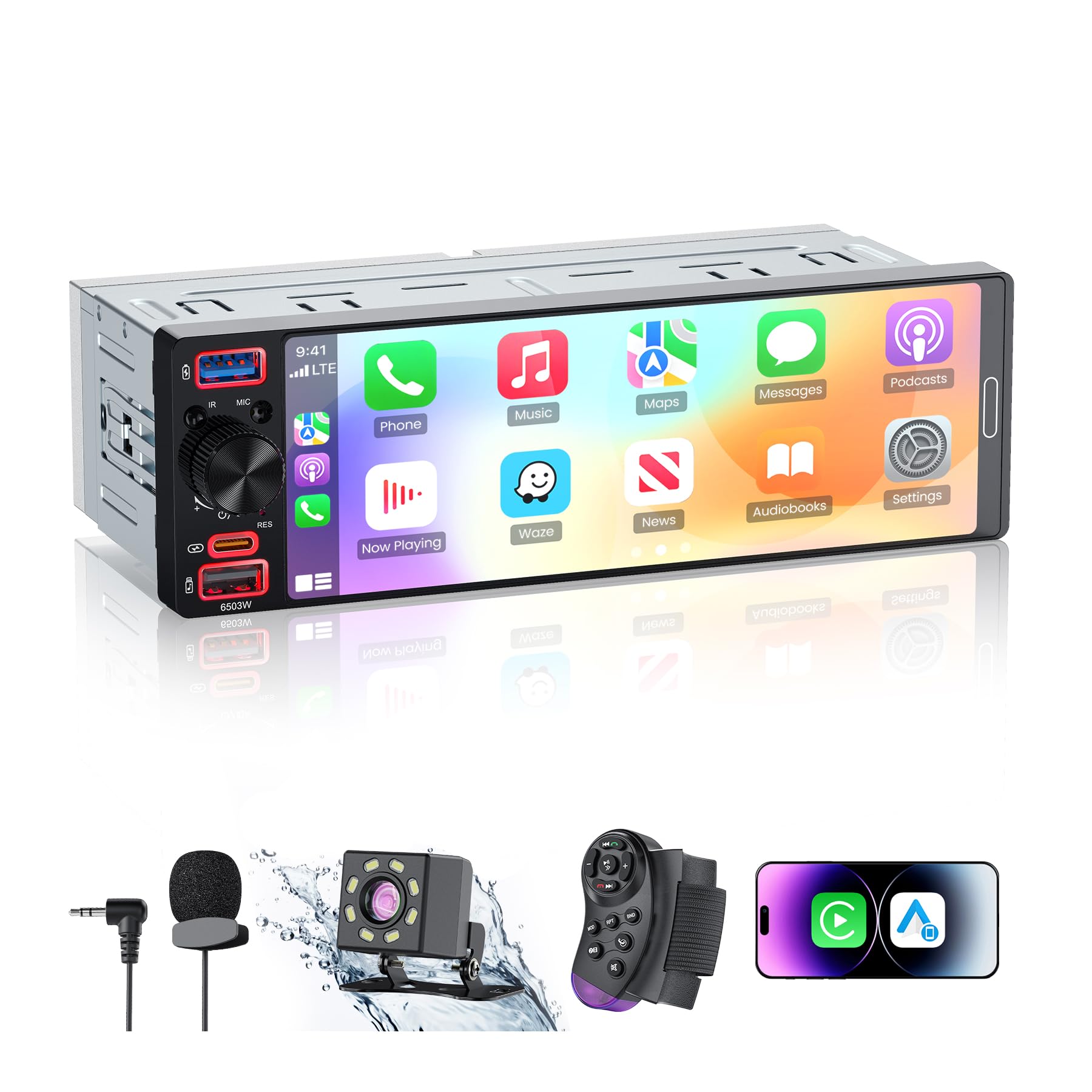
This is the “make my old vehicle feel current” pick for drivers who don’t want to spend big. The screen is the interesting part: GBEER uses an InCell panel rather than the cheaper Oncell construction most budget single-DIN units ship with, which means faster touch response, a sharper image, and — the one that actually matters in a car — noticeably better visibility in direct sunlight.
Android Auto and CarPlay both run wired or wireless, so you can leave the phone in your pocket and still get maps, calls, messages, music and voice control on screen. Wired and wireless Mirror Link is there too if you want YouTube or Spotify full-screen while parked (Netflix is not supported). A 1080p night-vision backup camera is included in the box — IP56 waterproof, with parking guidelines, auto-switching when you select reverse.
The practical details are handled better than the price suggests. Bluetooth 6.0 pairs quickly and holds; a 5-band EQ lets you set bass, treble, midrange and balance instead of leaving you with a fixed sound; and unlike a lot of budget receivers it keeps an AM tuner alongside FM, which still matters for weather and emergency broadcasts. Charging runs through both USB-A and a 38W Type-C port. It averages 4.3 stars across 191 Amazon ratings.
Why it’s worth considering
- InCell touchscreen – Faster response and far better sunlight visibility than typical budget panels.
- Wireless or wired CarPlay and Android Auto – No cable required once it is paired.
- 1080p night-vision backup camera included – IP56 rated with adjustable parking guidelines.
- 38W USB‑C fast charging – Plus a 5-band EQ and a real AM/FM tuner.
Good to know
- 12V DC vehicles only — GBEER states it is not compatible with 24V systems.
- Some vehicles still require adapters/harnesses; “single din” doesn’t mean “plug and play.”
- Mirror Link will not play Netflix, and it is a 5-band EQ rather than full DSP tuning.
Ideal for: budget-focused drivers who want wireless Android Auto and a genuinely readable touchscreen in a single-DIN dashboard without building a full audio project.
12. TECXERLLON 10.26″ Portable Screen – The “My Car Feels New” Upgrade You Don’t Have to Install
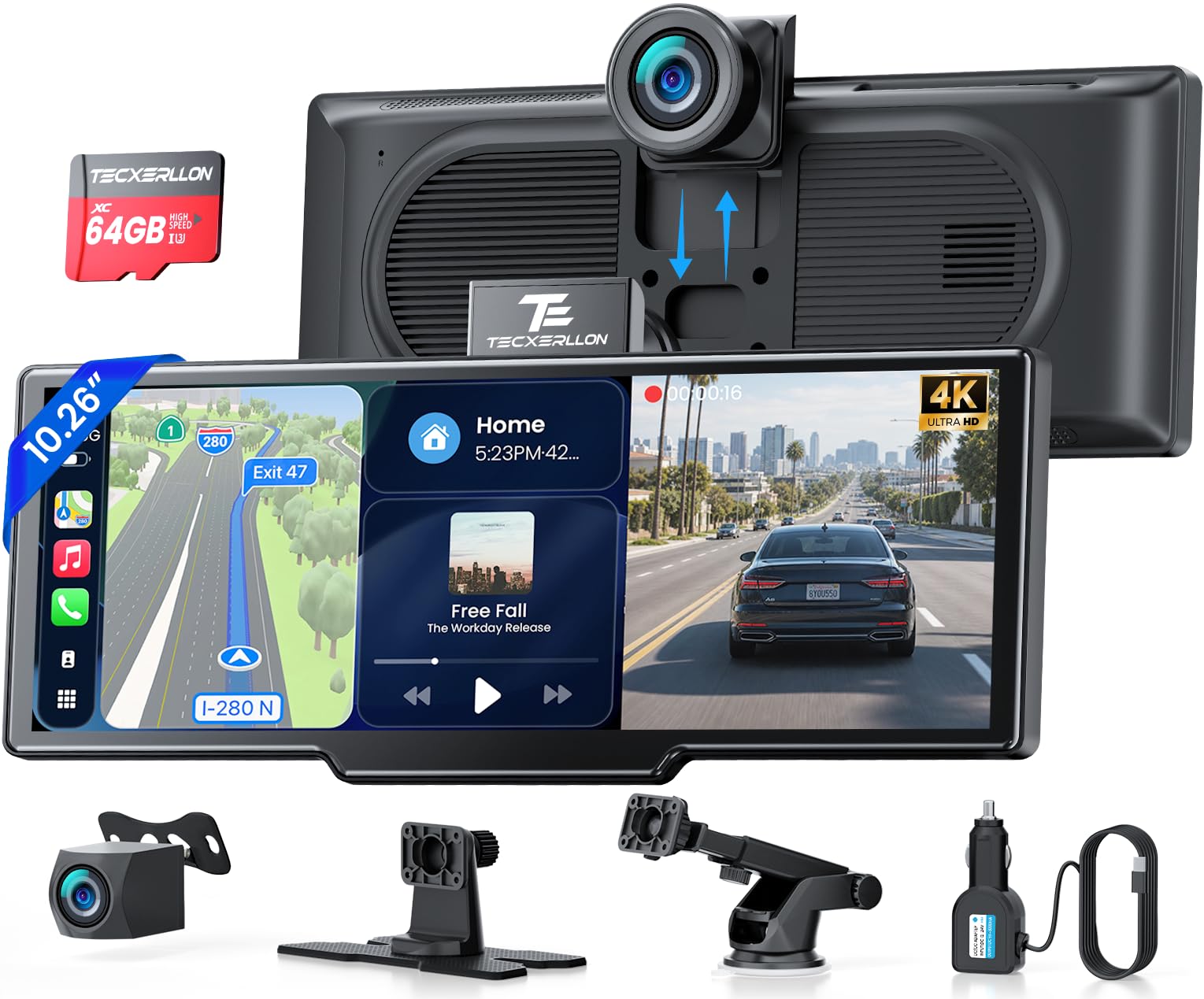
Portable screens are having a moment for a reason: they’re the fastest way to modernize an older car without pulling the dash apart. This TECXERLLON goes all-in on the “big screen” idea with a 10.26-inch HD IPS panel, and for drivers who love visibility it can feel like stepping into a much newer vehicle. Wireless CarPlay and Android Auto run over 5G Wi-Fi and Bluetooth 5.0, and it reconnects on its own once the car is running, so there is no ritual to perform every trip.
The dual-camera bundle is the second appeal, and here it is genuinely complete: a 4K front dash cam with loop recording and G-sensor emergency capture, a waterproof 1080p rear camera with parking guidelines, and a 64GB card in the box so you are not shopping for storage on day one. Mirror Link, AirPlay and Android Cast are all supported, and OTA firmware updates mean the unit keeps improving after you buy it. It averages 4.2 stars across 818 Amazon ratings.
The reality check is integration — and TECXERLLON gives you options. Dashboard and suction-cup mounts are both included, and audio can leave the unit three ways: Bluetooth to your factory stereo, a wired AUX connection, or the FM transmitter, with a built-in speaker as the fallback. AUX is still the cleanest path when your car has the socket. Steering wheel control support is there too, so you are not giving up your existing buttons.
Why it’s so satisfying
- 10.26″ HD IPS visibility – Maps are easier, music controls are easier, and you glance less.
- No dash teardown – Dashboard and suction mounts included; your factory radio stays put.
- 4K front + 1080p rear cameras with a 64GB card – Loop recording and G-sensor capture included.
- OTA updates and steering wheel control – It keeps improving, and you keep your existing buttons.
Good to know
- Cable management is the difference between “sleek” and “messy.” Plan routing before final mounting.
- Audio is only as good as your chosen output method (AUX usually beats the FM transmitter for clarity).
- Navigation runs through your phone’s apps rather than onboard maps.
Ideal for: drivers who want a large wireless Android Auto screen and full camera coverage without committing to a stereo installation.
13. IIWEY iK7 10″ Portable Screen – A Surprisingly Premium Feel for Older Cars

This iK7 is the kind of portable screen that makes people say, “Wait… why doesn’t every old car do this?” The appeal is the complete package: a large, clear display, wireless phone projection, and a camera bundle that can add both safety and peace of mind. The hardware is a 10-inch display available in black or white, wireless CarPlay and Android Auto with Siri or Google Assistant voice control, and AirPlay plus Miracast mirroring on top.
The camera workflow is a big part of the story. A portable unit with a front recorder and a backup camera can be genuinely useful if you actually install it cleanly. The key is treating it like a real install even though it’s “portable”: route cables neatly, mount the screen where it doesn’t block vision, and set up your audio path so it feels integrated. When you do that, you stop thinking of it as “an accessory” and start thinking of it as your new infotainment system.
IIWEY also puts its aftercare in writing, which is unusual at this price: a one-year warranty, a 30-day free return, 24/7 customer service, and — notably — free replacement of the memory card or power supply if the unit shows auto on/off behaviour, which IIWEY names as the usual cause. The box includes the 1080p rear camera, a 64GB SD card, a car charger, and both a suction mount and a 3M adhesive mount. It averages 4.3 stars across roughly 1,479 Amazon ratings.
Why it feels like a major upgrade
- Big screen clarity – Great for maps, voice control prompts, and media control.
- Camera bundle done right – If you install it cleanly, it becomes both convenience and safety.
- Wireless phone projection – The daily “get in and drive” payoff is real when pairing is stable.
- One-year warranty, 30-day returns and free replacement parts for power or card faults, per IIWEY.
Good to know
- Portable doesn’t mean “no setup.” The best results come from thoughtful mounting and cable routing.
- IIWEY itself notes that auto on/off behaviour usually traces to the memory card or the power supply.
- Audio quality depends on whether you use Bluetooth-to-car, AUX, or FM—choose based on your vehicle.
Ideal for: older vehicles that need a modern Android Auto screen and a camera setup, especially if you like the idea of “one box” doing navigation + recording + backup view.
14. HAUXIY Q9S 9″ Portable Screen – Practical Recording Features With a Simple Install Concept

If you like the idea of a portable screen but you also want recording coverage, the Q9S style of product can be a smart middle ground. You’re essentially adding a smart display plus a dash cam system in one move, without doing a full stereo replacement. For drivers with older cars, rentals, or vehicles where the dash is annoying to disassemble, that can be a very practical strategy.
The experience you’re chasing is simple: you mount it, power it, pair your phone, and you get your maps and music on a clean screen. Then you add the rear camera, and reversing becomes easier—especially at night and in tight spaces. HAUXIY runs OTA firmware updates on this one, which is what keeps a plug-in screen working as phone operating systems move underneath it.
The practical detail is cabling. The Q9S powers from the cigarette lighter socket with a 3.5 m cord, and the rear camera lead is a full 7 m, which is enough to reach the back of most vehicles but has to be routed somewhere. Two mounts are included and the factory radio stays in place. Audio can leave four ways — Bluetooth, the built-in speakers, FM or the AUX port. It averages 4.4 stars across roughly 546 Amazon ratings and currently ranks #1 in Amazon’s Car Satellite Radio Equipment category.
Why it makes sense
- All-in-one concept – Smart screen + recording + backup view without a stereo swap.
- Simple compatibility – Works across many vehicle types because it’s not dash-dependent.
- OTA firmware updates keep it compatible as phone software changes.
- Multiple audio options – Lets you adapt to your car’s audio setup.
Good to know
- Rear camera installation is still “real work” (routing a cable is the part people underestimate).
- Portable audio paths vary; Bluetooth-to-car or AUX often beats FM for consistent clarity.
- Powered from the cigarette lighter — the 3.5 m cord and 7 m camera lead both need routing.
Ideal for: drivers who want Android Auto and recording/backup camera features without replacing the factory head unit.
15. Krunia 9.26″ Portable Screen (OTA) – The “Keep It Updated, Keep It Smooth” Option

Portable screens can be fantastic—until they get stuck with a small software annoyance that never gets fixed. That’s why OTA updates are a bigger deal than most people realize. The Krunia approach aims to make the product feel more like a living device than a one-and-done gadget, which is exactly what you want when your phone and apps evolve constantly.
The display specification is unusually concrete for this category: an IPS panel quoted at 550 cd/m² brightness, a 1000:1 contrast ratio, 16.7 million colours and a 1600 x 600 resolution, driven over 5G Wi-Fi and Bluetooth 5.0. Krunia rates the unit for operation from -20°C to 70°C. Practicalities still matter, though — route the wires behind trim panels for a clean look, and pick your FM channel carefully if your car has no AUX socket.
The waterproof night-vision backup camera displays automatically when you select reverse, and Krunia supplies a 19.69 ft camera cable, wire clips, adhesive gaskets and both suction and adhesive mounts to get it there tidily. An in-dash system will always feel more integrated for camera geometry; if what you want is practical reversing confidence plus easy navigation without touching the dashboard, this is a strong portable answer. It averages 4.4 stars across roughly 2,980 Amazon ratings.
Why it stands out
- OTA updates – A real advantage for long-term polish and bug fixes.
- Bright, sharp screen – Readable in daylight with clean map presentation.
- Rated for -20°C to 70°C operation, with a two-year warranty on request.
- Good “older car upgrade” energy – Modern interface without changing the factory dashboard.
Good to know
- No dash cam on this model — Krunia’s own range comparison marks the RC06 as dash-cam free.
- Krunia warns that phones on Android 16 may drop Android Auto; the fix is an OTA update plus the Evelink app.
- FM audio can be location-dependent; AUX or Bluetooth-to-car often feels more consistent when available.
Ideal for: drivers who want a portable Android Auto screen that feels maintainable and polished over time, especially for older cars you don’t want to disassemble.
16. PASLDA 7″ Portable Screen – The Lowest-Cost Way Into Android Auto, With Real Trade-Offs
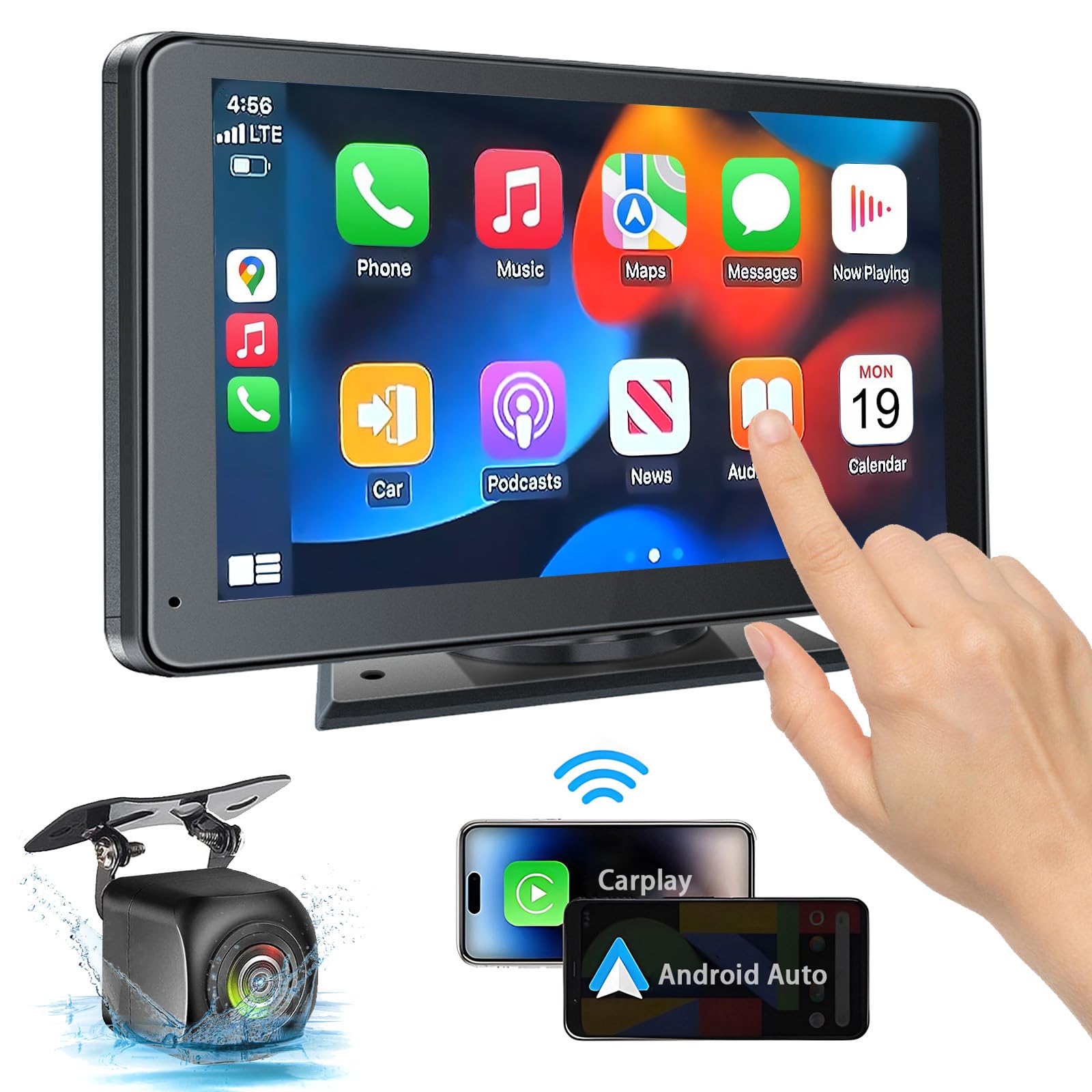
This is the “I want Android Auto on a screen, and I want to spend as little as possible” option — the cheapest pick in this guide, and the one you should approach with the clearest eyes. PASLDA lists both wireless and wired Android Auto and CarPlay, with Google Assistant or Siri handling navigation, calls, messages and music, and the unit runs on a 12V–24V supply so it works in cars, pickups, RVs, vans, campers and trailers alike. Nothing comes out of the dashboard: a 360-degree rotatable suction mount plus a self-adhesive bracket is the entire install.
The screen is a 7-inch 2.5D touchscreen at 1024×600 that PASLDA rates for 1080p playback, and audio is where this category lives or dies. You get four routes out: Bluetooth to the car’s own speakers, AUX, an FM transmitter, or the unit’s built-in speaker — PASLDA specifically calls the Bluetooth-to-car-speaker path the one that improves sound quality over the built-in driver, and that is the route to try first if your car supports it. Bluetooth 5.2 covers hands-free calling and streaming, and mirror link works over the phone’s original data cable for both Android and iOS if you want YouTube or TikTok on the screen while parked. A waterproof night-vision rear camera is included and switches on automatically when you select reverse. The whole thing measures 7.36 x 4.21 x 0.9 inches and weighs 1.9 pounds.
Now the honest part. It averages 3.9 stars across roughly 3,590 Amazon ratings — the lowest average score in this guide, sitting on one of its largest samples. Read that pairing for what it is: a lot of people buy it, and satisfaction is genuinely more mixed than with the pricier portable picks above. PASLDA also sets a compatibility floor of iOS 9 or Android 11 and above, and its listing publishes no brightness or contrast figure, which is exactly the number you would want in order to judge sunlight readability. Treat setup as a test: try Bluetooth or AUX before settling for FM, check the screen at midday and at night, and confirm the suction mount holds on your dashboard before you commit to routing the reverse camera cable.
Why some people still buy it
- Lowest-cost path to a smart screen – Wireless and wired Android Auto without a stereo install.
- Fits almost anything – 12V–24V operation covers cars, trucks, RVs, vans, campers and trailers.
- Four audio routes – Bluetooth to the car’s speakers, AUX, FM transmitter, or the built-in speaker.
- Rear camera included – Waterproof, night-vision, and it switches on automatically in reverse.
Good to know
- 3.9-star average across roughly 3,590 ratings — the lowest score in this guide, on a large sample.
- No brightness or contrast figure is published, so daylight readability is an open question until you test it.
- Requires iOS 9 or Android 11 and above; mirror link needs the phone’s original cable.
- If you want a “set it and forget it” experience, step up to a more polished portable model.
Ideal for: budget shoppers who want wireless Android Auto in an older car, will test it against their own dashboard and lighting, and can live with a mixed review record if the core functions work in their vehicle.
How Android Auto Actually Behaves in Real Cars (And How to Avoid the Common Failures)
Here’s the part most guides skip: a car stereo can be “good,” and Android Auto can still feel bad if the environment is wrong. The environment is your power, wiring, phone behavior, and audio routing. Fix those and even a value unit can feel surprisingly smooth. Ignore them and even a great unit can feel flaky.
1. Wireless Android Auto is a two-link chain: Bluetooth starts it, Wi‑Fi carries it
Most wireless Android Auto setups use Bluetooth for the handshake and Wi‑Fi for the heavy lifting (maps, audio, data). That means:
- Bluetooth stability matters for pairing and calls.
- Wi‑Fi stability matters for keeping the session alive.
- Power stability matters because a voltage dip can reset the chain.
Practical take: if wireless drops, it’s often not “Android Auto is bad.” It’s that something in the chain is getting disrupted. Cleaner wiring, better USB power behavior (if the unit uses USB for some functions), and reducing interference can change your experience dramatically.
2. The #1 “secret weapon” for stability is clean power and grounding
A lot of random glitches—freezes, restarts, weird audio pops—are powered by messy electrical conditions. Cars are noisy electrical environments. Add an aftermarket stereo and you’re introducing new grounds, new cable runs, and sometimes imperfect connections.
- Clean ground point: A solid ground connection is not optional. A weak ground can create noise, instability, and strange behavior.
- Tidy splices: Crimped properly or soldered cleanly. Loose connections create intermittent “ghost problems.”
- Stable power source: Make sure constant and switched power are correct and reliable for your vehicle.
3. Wired Android Auto still fails… mostly because of cables
If you choose a wired Android Auto unit (like many sound-focused models), you’re trading wireless complexity for cable reality. A bad cable can cause disconnects, slow response, or “it connects but doesn’t fully work” behavior.
- Use a high-quality data cable (not just a “charging cable”).
- Avoid flimsy USB extensions unless you know they support data well.
- Route the cable so it doesn’t bend sharply or get tugged by daily phone movement.
If you want a clean look, route the cable to a convenient pocket or a flush USB port. The goal is to make “plug in” feel effortless instead of annoying.
4. Audio routing: how you feed sound determines whether portable screens feel “good”
Portable screens almost always give you multiple audio options. Here’s the practical truth:
- AUX often gives the cleanest, most consistent audio (if your car has it).
- Bluetooth-to-car can be very good if your factory Bluetooth is decent and stable.
- FM transmitter is the most universal but can be the most environment-dependent (interference varies by area).
- Built-in speaker is a last resort for most people (fine in a pinch, not satisfying long-term).
If you buy a portable unit and then hate the sound, don’t assume the product is trash. Try a different output method first. The same screen can feel wildly different depending on the audio path.
5. Microphone placement is not “extra” — it’s the call quality upgrade
If calls matter to you, treat the microphone like a real component:
- Mount it where your voice is clear (often near the driver’s visor area).
- Avoid placing it directly in line with vents.
- Keep it away from rattly trim and loose cables that can create vibration noise.
Most “bad mic” complaints are actually “bad mic placement” complaints. Not always—but often enough that it’s worth doing right.
6. Camera behavior: understand what’s normal vs what’s annoying
Some head units cut audio when switching to reverse camera mode. Some switch instantly. Some delay. Some portable systems cut audio too. This is not always a defect—it’s often the way the unit prioritizes camera display. The question is: does it return to your audio cleanly, or does it make you “press play again” constantly?
Before you finalize installation, test the reverse behavior:
- Shift to reverse, confirm image and guidelines.
- Shift back to drive, confirm audio resumes the way you expect.
- If it doesn’t, check settings (some units allow different camera priority behavior).
That tiny test prevents the most common daily frustration people discover after they’ve already routed the cable and buttoned up the dash.
FAQ: Android Car Audio Upgrades (Without the Confusion)
What’s the difference between “Android Auto” and an “Android car stereo”?
Should I pick wireless or wired Android Auto?
Do I need a professional install?
Why do some people complain about microphone quality?
Will these work with my steering wheel controls?
What’s the best way to upgrade an older car without replacing the stereo?
Why does FM audio sometimes sound worse on portable screens?
Do I need a backup camera upgrade too?
Final Thoughts: Pick the Upgrade That Makes Driving Feel Easier
A great car audio upgrade doesn’t just add features. It removes friction. The best ones make you think, two weeks later, “Why didn’t I do this sooner?”
Here’s the simplest way to translate this guide into the right buy:
- Want the best all-around cockpit upgrade with a big screen? Start with the PLZ 10.1″ Wireless Single DIN Floating. It hits the sweet spot of screen comfort, wireless convenience, and useful sound control.
- Care most about sound tuning and control? Go with the Alpine iLX‑W670. If you want your system to feel balanced, intentional, and dialed in, it gives you the tools.
- Want a double din that runs its own apps, not just your phone’s? The ATOTO A5L 7″ Android Double DIN pairs wired and wireless Android Auto with an Android head unit, a 24-band EQ and a camera in the box.
- Want the most-reviewed unit here and the biggest pool of shared install know-how? Choose the BOSS BV9358B — roughly 5,515 Amazon ratings means whatever your car throws at you mid-install, someone has hit it first.
- Running more than one camera? The Soundstream VRCPAA‑7DRM takes front and rear camera inputs with a 12V trigger, and still gives you a 10-band EQ and 4V pre-outs for an amp later.
- Want certified phone projection and warranty cover that lasts? The Jensen J1CA7‑BUC ships with the backup camera and external microphone, and extends to a four-year warranty when you register it.
- Want the sharpest budget-friendly visuals? The SJoyBring 7″ QLED Double DIN brings a crisp, modern dashboard look without premium pricing.
- Want a portable solution that makes an older car feel new fast? Start with the TECXERLLON 10.26″ Portable Screen or the IIWEY iK7 10″ Portable Screen. These are big-impact upgrades without a dash teardown.
The final filter is simple: choose the best android car audio solution that matches how you actually drive. If you want clean integration and audio control, go in-dash. If you want the fastest, least invasive modern upgrade, go portable. Either way, pick the model that fits your habits—wireless vs wired, knob vs touch, audio-first vs convenience-first— and you’ll end up with a setup that feels calm, modern, and genuinely enjoyable every day.