
Our readers keep the lights on and the garage heater humming. As an Amazon Associate, I earn from qualifying purchases.
Specs are compiled from manufacturer listings and verified buyer reviews and can change over time — please confirm the key details on the product page before buying.
You glance down to check your speed, and in that split second, the car ahead brakes. A windshield HUD display puts that number — and your engine’s vital signs — right in your line of sight, so your eyes never leave the road. The catch is that not every unit reads accurately from your car’s computer, and a bad install can leave you with a ghostly double-image or a blank screen. This guide breaks down the seven best options, from the universal GPS-only models that work in any vehicle to the feature-packed OBD2 scanners that pull real-time data, so you choose the one that actually fits your car and your driving style.
I’m Mo Maruf — the founder and writer behind GoCarLife. This guide is built by comparing the manufacturers’ published specifications and the patterns across verified customer reviews, so you get each pick’s real strengths and trade-offs instead of marketing spin.
Whether you drive a modern sedan or a classic truck, a reliable windshield hud display turns your dash data into a floating heads-up image, helping you stay aware without looking away from the road ahead.
Our Picks at a Glance
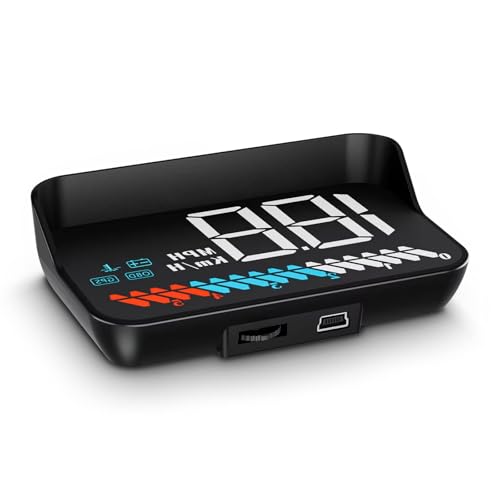

How To Choose The Best Windshield HUD Display
Picking the right head-up display depends on three key factors: how it pulls data, what information you actually want to see, and whether it will work with your specific car. Get these right, and you end up with a device that feels like a factory upgrade rather than a gimmick.
OBD2 vs. GPS Data Source
An OBD2-connected HUD plugs directly into your car’s diagnostic port. This gives you real-time engine data like RPM, water temperature, voltage, and fault codes, with almost no delay. However, it requires your car to have an OBD2 port that uses a compatible protocol — most gasoline vehicles after 2008 qualify, but many diesel, hybrid, and older models do not. A GPS-only HUD uses satellite signals to calculate speed and position. It works in literally any vehicle, but the speed readout can lag slightly, especially around town, and it won’t show engine metrics like coolant temp.
Display Readability and Glare
During the day, direct sunlight can wash out a weak projection. Most HUDs come with a reflective film you stick to the windshield to combat ghosting and improve contrast. Premium units use a semi-transparent reflective panel that sits on the dash instead, offering a sharper image without the sticky film. At night, automatic brightness adjustment is critical — a screen that is too bright at 11 p.m. becomes a major distraction.
Mounting and Installation
Some HUDs sit on a sticky pad on the dashboard. Others mount to the A-pillar trim, placing the display right beside your natural field of view. A third style projects onto a separate transparent panel. The right choice depends on your dash shape and how much windshield space you are willing to sacrifice. Most units are plug-and-play, with a cable tucking into the trim, but a few may require a separate mounting kit that is not included in the box.
Quick Comparison
| Model | Best For | Data Source | Display Type | Extra Gauges | Amazon |
|---|---|---|---|---|---|
| Head up Display M7★ Best Overall | Budget-friendly dual system | OBD2 + GPS | Plastic lens | RPM, voltage, water temp | Amazon |
| MH OBD2+GPS DisplayTop Performer | Full diagnostic scanning | OBD2 + GPS | Glass/metal unit | Fuel consump, turbo, compass | Amazon |
| AZIJYV P24 Gauge | Color LCD with ambient lights | OBD2 + GPS | 3.5-inch color LCD | Fuel level, intake press, slope | Amazon |
| Head Up Display P8 | A-pillar mounting | OBD2 + GPS | Plastic unit | Boost, MAF, fuel flow | Amazon |
| wiiyii T900 HUD | Universal GPS-only | GPS only | 3D HD projector | Altitude, clock, trip meter | Amazon |
| Arestech A8 HUD | Large 5.5-inch display | OBD2 only | 5.5-inch color | RPM, water temp, fuel econ | Amazon |
| wiiyii C5 HUD | Dual mode with fault clearing | OBD2 + GPS | Reflective panel | Fuel consump, altitude, DTC | Amazon |
In‑Depth Reviews
1. Head up Display M7 (wiiyii)
The crowd-favorite dual-system unit that balances cost with real-world usefulness.
This is the most-discussed HUD in the budget tier for a reason: it works as a plug-and-play OBD2 scanner and a GPS backup. At just 3.54 x 2.09 x 1.02 inches, it fits almost any dashboard without protruding into your windshield view. It reads speed, water temperature, voltage, and RPM from the OBD2 port, and automatically adjusts brightness based on ambient light. If your car is not OBD2-compatible, you switch to GPS mode in five seconds.
The trade-off appears in accuracy. Buyers report a ~1-2 second delay that is fine for maintaining highway speed but not for quick city corrections. A few owners also mention the reflective sticky pad collecting dust over time; the pad is washable.
Why it wins people over
- Dual OBD2+GPS modes cover almost any car made after 2008
- Auto-dimming adjusts brightness for day and night driving
- Compact size fits tight dashboards and does not block the road
Where it slips
- Speed readout can lag by about 1-2 seconds
- Some cars (like the Nissan Versa) do not support OBD2 mode
- Sticky mounting pad attracts dirt and needs regular cleaning
The right fit if: you want a safe entry into HUDs with the security of two data sources — when OBD2 fails, GPS still works.
Look elsewhere if: you need near-instantaneous speed reaction for stop-and-go traffic or you drive a vehicle outside the 2008+ OBD2 compatibility window.
2. MH OBD2+GPS Display (MH-P6)
A full-featured scanner that pulls turbo pressure, fuel consumption, and fault codes to your windshield.
The MH-P6 stands apart because it reads engine trouble codes — and lets you clear them with a short press of the ‘OK’ button. It displays speed, tachometer, water temperature, voltage, fuel consumption, driving time, altitude, compass direction, and even turbo pressure. The 4.3 x 3.3 x 3-inch housing is built from glass and metal rather than the usual ABS plastic, giving it a more premium feel on the dash. It comes with an adjustable bracket for either dashboard or windshield mounting.
But the GPS speed mode has a clear limitation: buyers found it inaccurate above 25 mph on multiple vehicles when compared against phone GPS apps. OBD2 mode does not have this issue, so you should run it in OBD2 if your car is compatible. That is a key difference from the M7, which has a smaller form factor but cannot clear fault codes. The MH-P6 is best for the owner who wants both a diagnostic tool and a heads-up interface in one device.
What makes it stand out
- Scans and clears engine fault codes directly from the windshield
- Glass-and-metal construction feels more substantial than plastic rivals
- 10 display interfaces with adjustable brightness (8 levels)
Where it falls short
- GPS speed reading drifts above 25 mph on some vehicles
- Incompatible with diesel, hybrids, and several European brands
- Timer shut-off function does not work on some units
Buy this if: you want a diagnostic code reader integrated into your HUD and prefer a sturdier glass-and-metal build.
skip it if: you drive one of the incompatible brands (Jeep, Peugeot, Citroën, Fiat, Renault, DS, Lamborghini, SIMCA, Suzuki) or rely entirely on GPS-only speed.
3. AZIJYV P24 OBD2 Gauge

A 3.5-inch color LCD that surrounds your speed with ambient lighting in 13 switchable layouts.
The P24 is the most visually engaging HUD in this lineup. Its 3.5-inch color LCD shows 13 different display screens that cycle through speed, RPM, fuel consumption, intake pressure, oil temperature, transmission oil temperature, turbo pressure, engine load, and even a slope-and-tilt angle for off-road awareness. The ambient lighting glows in blue, red, purple, and other colors, which makes it feel more like an interior upgrade than a utilitarian tool. It reads data from OBD2 or GPS and also performs acceleration and brake tests.
Reliability is the primary caution here. While the value-for-money rating is strong, the overall functionality feedback is mixed: some owners mention intermittent operation and settings that reset on their own. The fuel-level reading was flagged as inaccurate on an older Honda Civic. Compared to the MH-P6 above, the P24 gives you far more display screens and sensor data, but the build quality is standard ABS plastic rather than glass and metal.
What you will love
- Rich color display with 13 interface options and customizable ambient lights
- Wide range of sensors: intake pressure, oil temp, turbo pressure, slope angle
- Dual OBD2+GPS with integrated acceleration and brake tests
What to watch for
- Some units lose settings and restart unexpectedly
- Fuel level readings may not be accurate on older cars
- ABS plastic build feels less premium than glass/metal alternatives
Who it suits: drivers who want the most visual information on a bright, colorful screen and enjoy custom ambient lighting.
Not for you if: you need a dead-reliable daily driver unit with zero glitches, or you prefer an understated, basic display.
4. Head Up Display P8 (A-Pillar)

The only HUD that mounts to your A-pillar trim, freeing up windshield real estate entirely.
The P8 takes the data you see on the P24’s screen and places it on a small, unobtrusive display mounted to the A-pillar. This is a huge advantage if you dislike anything sticking to your windshield. It pulls raw OBD data and can show oil temperature, coolant temperature, battery voltage, intake pressure, mass air flow (MAF), fuel flow, and turbo boost. The speed accuracy is strong at +/-1 mph after applying a compensation setting in the menu. Owners who use it on tuned AMG engines particularly value the boost readout.
Longevity is the recurring question. A number of customers note the unit failing after about three months, and the manufacturer’s support response has been inconsistent. The screen auto-dims, but some drivers find it still too bright at night. Compared to the MH-P6, the P8 cannot clear fault codes; it is purely a monitoring tool. The included Velcro mounting strips are not strong enough — most buyers recommend upgrading to heavy-duty automotive tape.
Why it stands out
- Mounts on the A-pillar — no windshield film or dashboard pad required
- Displays boost, MAF, fuel flow, and intake pressure for performance owners
- Speed accurate to +/-1 mph after compensation setting
The downsides
- Some units stop working after 3 months; support may not replace them
- Fuel economy display is locked to metric (km/L) in US models
- Included Velcro is weak; heavy-duty tape is a must
Reach for this if: you own a performance car and want a clean A-pillar installation that reads boost, MAF, and fuel flow without windshield clutter.
Think twice if: you want a device you can trust for more than a year, or you prefer a simple speed-only display.
5. wiiyii T900 HUD

The simple GPS-only device that works in absolutely any vehicle — no OBD2 port needed.
The T900 connects through a USB-A port and collects all its data from GPS satellites. That means it is compatible with trucks, buses, new energy vehicles, hybrids, and classic cars that have no OBD2 port at all. It projects speed, a satellite clock, altitude, and trip distance onto a 3D HD display that remains readable in direct sunlight. The speed accuracy sits within 1 mph or kph after you set a percentage correction in the menu. A Chevy Silverado owner set theirs to 103% for a spot-on reading.
The limitation is obvious: no engine diagnostics at all. You get speed, time, altitude, voltage, and trip data, but nothing about water temperature, RPM, or fault codes. Some reviewers point out the unit occasionally turning off at random and needing a reconnection. Because it does not use the OBD2 port, it also avoids any risk of draining your car battery if left plugged in. The T900 is a clear pick over the M7 when you drive a non-standard vehicle and only need the basics.
What is great about it
- Works with every vehicle — trucks, EVs, hybrids, diesel, and classics
- Speed accuracy within 1 mph/kph after calibration
- USB-powered; zero risk of battery drain and no OBD2 port conflict
The catch
- Only shows GPS-based data — no engine diagnostics or coolant temp
- Some units turn off randomly and require a manual reconnect
- Included dash film is thin and may not hold well on textured surfaces
Perfect for: anyone driving a vehicle that is not a standard gasoline car from 2008 or later — or anyone who wants a simple, distraction-free speed display.
Not for you if: you need RPM, water temperature, fault codes, or any engine data on your windshield.
6. Arestech A8 HUD (5.5″)

A 5.5-inch color screen that projects speed, RPM, and fuel economy across a wide reflective surface.
If you want the biggest projection area, this is it. The A8 features a 5.5-inch color display with a nano-tech anti-ghosting reflective film to keep the image crisp in sunlight. It reads speed, RPM, water temperature, and single mileage from the OBD2 port, and includes an integrated overspeed warning system. It is pre-calibrated to mph and offers both manual and automatic brightness adjustment. An auto power-on/off syncs with your ignition to protect the battery.
Reliability is the main worry here. Several shoppers say the unit dying after about eight weeks, and the seller’s warranty support has been inconsistent. The RPM display disappears above 80 mph, which defeats the purpose for anyone buying it specifically for tachometer visibility at highway speeds. Fuel economy is displayed only in metric (L/100km) in US models, and the manual has difficult-to-follow English. Compared to the P24, the A8 has a larger screen but lacks the color customization and dual-system flexibility.
Why it is worth considering
- Largest display in the lineup at 5.5 inches — easy to read at a glance
- Auto power-on/off with ignition prevents battery drain
- Pre-calibrated to mph from the start for US drivers
Where it disappoints
- Unit may fail within 8 weeks; warranty support is limited
- RPM screen disappears above 80 mph and returns below 79 mph
- No GPS backup — OBD2 only, and requires 2004+ US gasoline vehicles
Grab it if: screen size is your top priority and you drive a newer US gasoline car that is fully OBD2-compatible.
Pass if: you want a device that lasts more than a few months, or you need RPM visibility at highway speeds.
7. wiiyii C5 HUD

A semi-transparent reflective panel that eliminates windshield film and shows crisp data.
The C5 uses a transparent reflective panel rather than a sticky film. This means zero ghosting and no need to clean a dirty film after a few weeks. It is a dual-system unit that switches between OBD2 and GPS modes with one button, and it works in all cars, trucks, hybrids, and diesel vehicles. In OBD2 mode, it shows speed, RPM, fuel consumption, water temperature, voltage, clock, driving time, altitude, and satellite count — and it can clear engine fault codes. GPS mode covers speed, time, voltage, trip distance, direction, and altitude.
The common gripe is speed accuracy. The OBD2 reading can be off by about 2 mph when compared to the vehicle’s own computer, and GPS mode adds a slight delay that is fine on the freeway but noticeable on surface streets. The manual is light on detail, and the time only displays in 2400 format (no AM/PM). Compared to the MH-P6, the C5 offers a similar feature set but uses a plastic housing instead of glass, and its reflective panel mount is more about windshield placement than A-pillar mounting.
Why it is a strong option
- Reflective panel gives a sharp image without sticky windshield film
- Dual OBD2+GPS works in any vehicle, including hybrids and diesel
- Can clear engine fault codes without a separate scanner
What to expect
- OBD2 speed can be 2 mph off; GPS mode has a slight delay
- Manual is minimal — the setup process takes some trial and error
- Time is in 2400 format; no AM/PM display option
Choose this if: you want a dual-system HUD with a clean reflective panel and the ability to clear fault codes — particularly in a hybrid or diesel.
Not ideal if: precise speed accuracy is critical or you prefer a simple plug-and-play setup with clear instructions.
Understanding the Specs
OBD2 vs. GPS Data Source
An OBD2-connected HUD reads directly from your engine computer. This gives you real-time speed, RPM, coolant temperature, voltage, and fuel consumption with almost no lag. It can also scan and clear diagnostic trouble codes. However, it only works with vehicles that have a compatible OBD2 port — typically gas cars built after 2008. A GPS-only unit uses satellite signals to calculate speed and position. It works in every vehicle on the road but cannot show engine metrics, and the speed readout can lag by 1–2 seconds at lower speeds.
Display Type and Brightness
There are three common display approaches: a plastic lens with a reflective film stuck to the windshield, a standalone semi-transparent panel that sits on the dash, or a direct projection onto a dedicated screen. The semi-transparent panel generally offers the clearest image with no ghosting. Automatic brightness adjustment is critical — a screen that is too bright at night becomes a dangerous distraction. Some units offer 8-level manual brightness control, while others auto-detect ambient light.
FAQ
Will a windshield HUD work with my car?
Is a GPS HUD as accurate as an OBD2 HUD?
Can I install a HUD without sticking film to my windshield?
Will a HUD drain my car battery?
What does “dual system” mean in a HUD?
Can a HUD display engine fault codes?
How do I improve HUD readability in bright sunlight?
Will a HUD work with polarized sunglasses?
What is the difference between a HUD and an OBD2 gauge display?
Can I use a HUD with my phone’s GPS app for better accuracy?
Final Thoughts: The Verdict
For most buyers, the best windshield HUD display winner is the wiiyii M7 because it gives you the security of a dual OBD2+GPS system at a price that does not hurt, with a compact footprint that fits any dashboard and automatic brightness that keeps it readable day and night. If you want a full diagnostic tool with fault code scanning and a glass-and-metal build, grab the MH-P6. And if you drive a non-standard vehicle (a truck, hybrid, diesel, or classic) and just need a reliable speed and time display, the wiiyii T900 is the one to reach for.
How We Picked
We do not accept paid placement. Every pick is matched to a real buyer and a real use-case; we do not hands-on test units.
Sources & Methodology
Specifications: manufacturer listings and product documentation. Review insights: verified customer reviews, as of July 2026. Pricing: not shown on this page (it changes often); check the current price via the retailer link.
As an Amazon Associate, GoCarLife earns from qualifying purchases. This does not affect which products we feature.